

Invoices & ExpensesNeu
Invoices your customers open, pay and keep. Receipts that file themselves.
Invoicing software with your logo, colors, product photos and social links, a live page with a Pay now button for every invoice, receipts read from a photo, and QuickBooks kept in step. Customers pay by card through your own Stripe, PayPal, Square or Authorize.net account; aiKit never touches the card.
Kostenloses Konto, keine Karte nötig. Du nutzt aiKit schon? Anmelden, um Invoices & Expenses zu öffnen
Das bekommst du
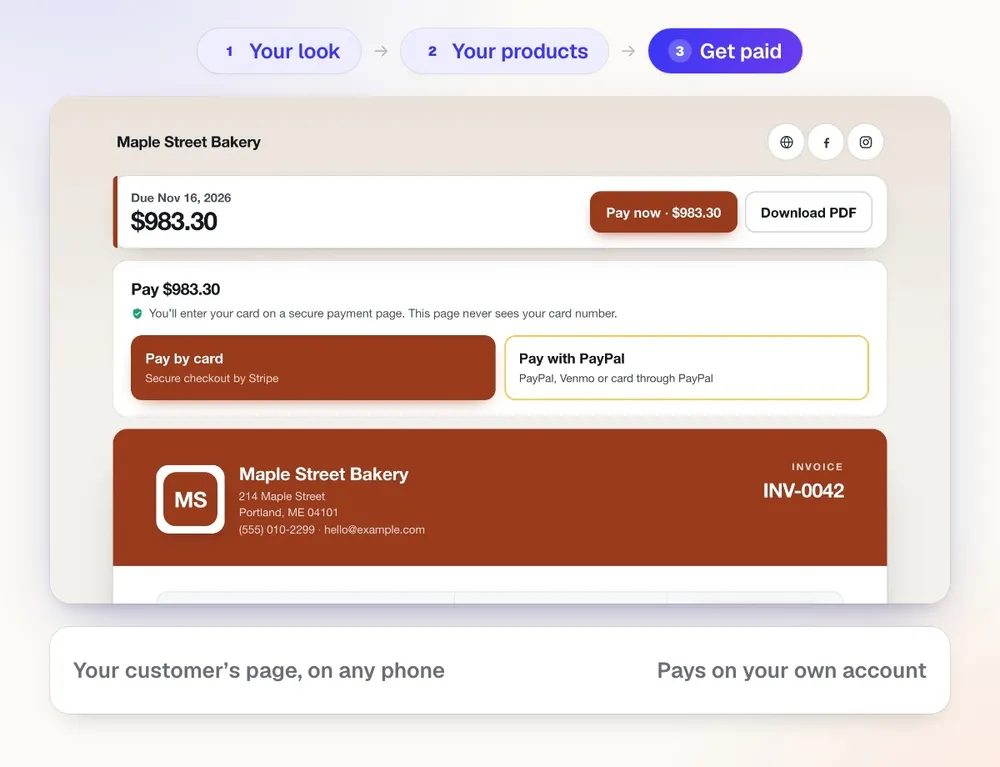
Send designed invoices your customers open, download and pay by card through your own Stripe, PayPal, Square or Authorize.
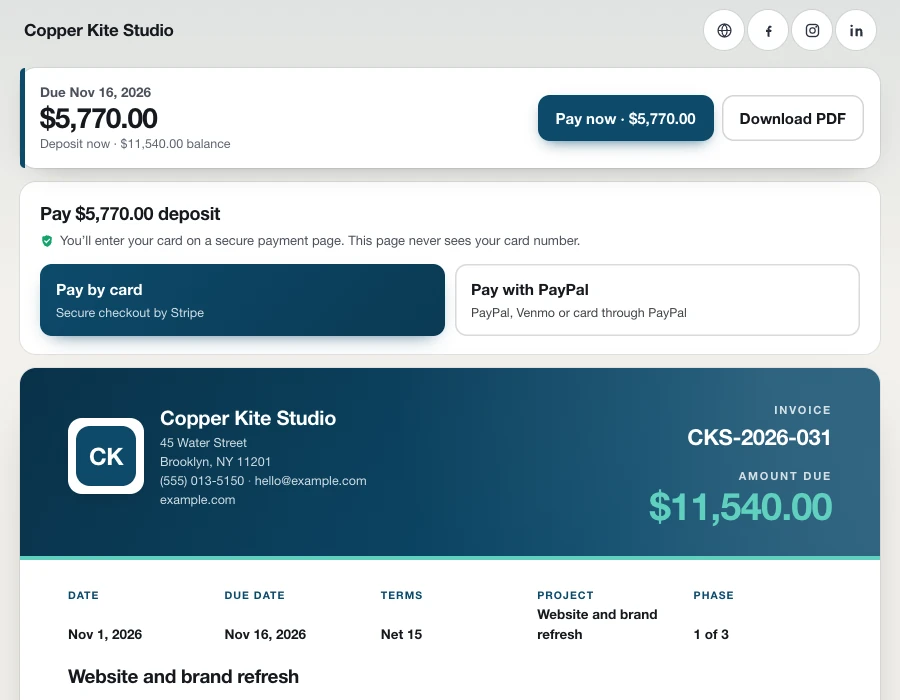
Pay now, by card, on your own account
Connect the Stripe, PayPal, Square or Authorize.net account you already use. Your customer presses Pay now on the invoice, the PDF or their page, pays on that company's secure page, and the invoice marks itself paid. A deposit shows as the amount due now, with the balance under it.
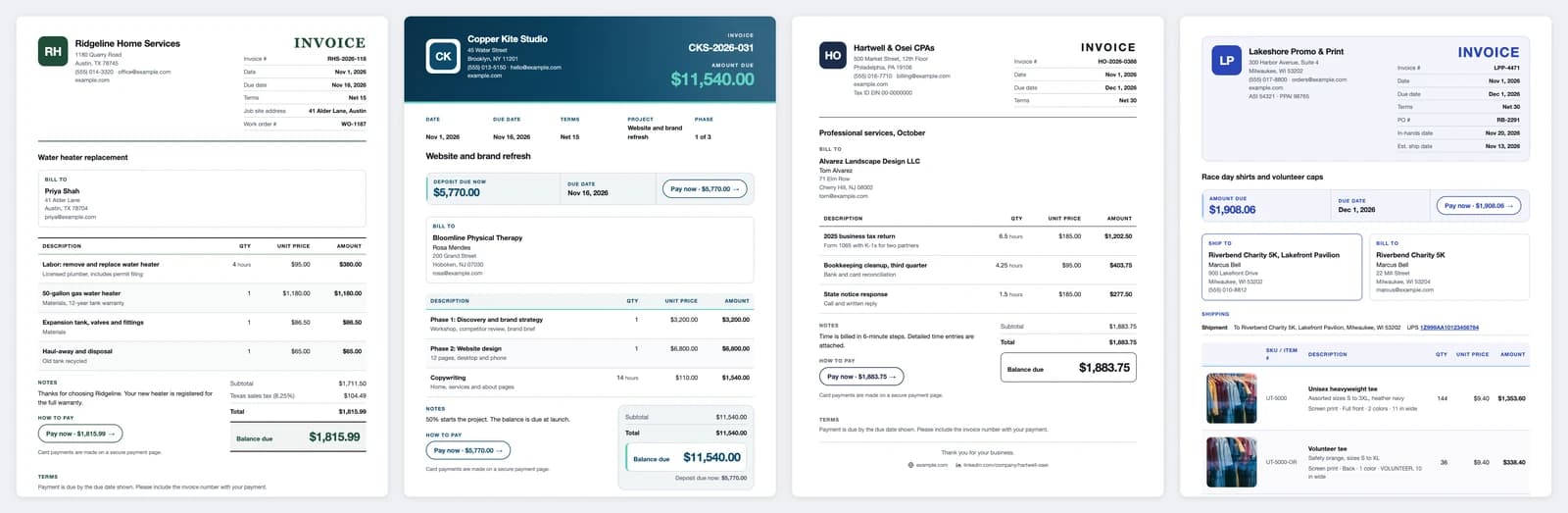
Seven layouts, one for every kind of work
Classic for a contractor's labor and materials, Modern with a deep color header for a studio, Minimal for an accounting firm's hours, Product & promo for a reseller, plus Elegant, Bold and Banded. Each wears your colors, font and logo, or a monogram of your initials until you add one.
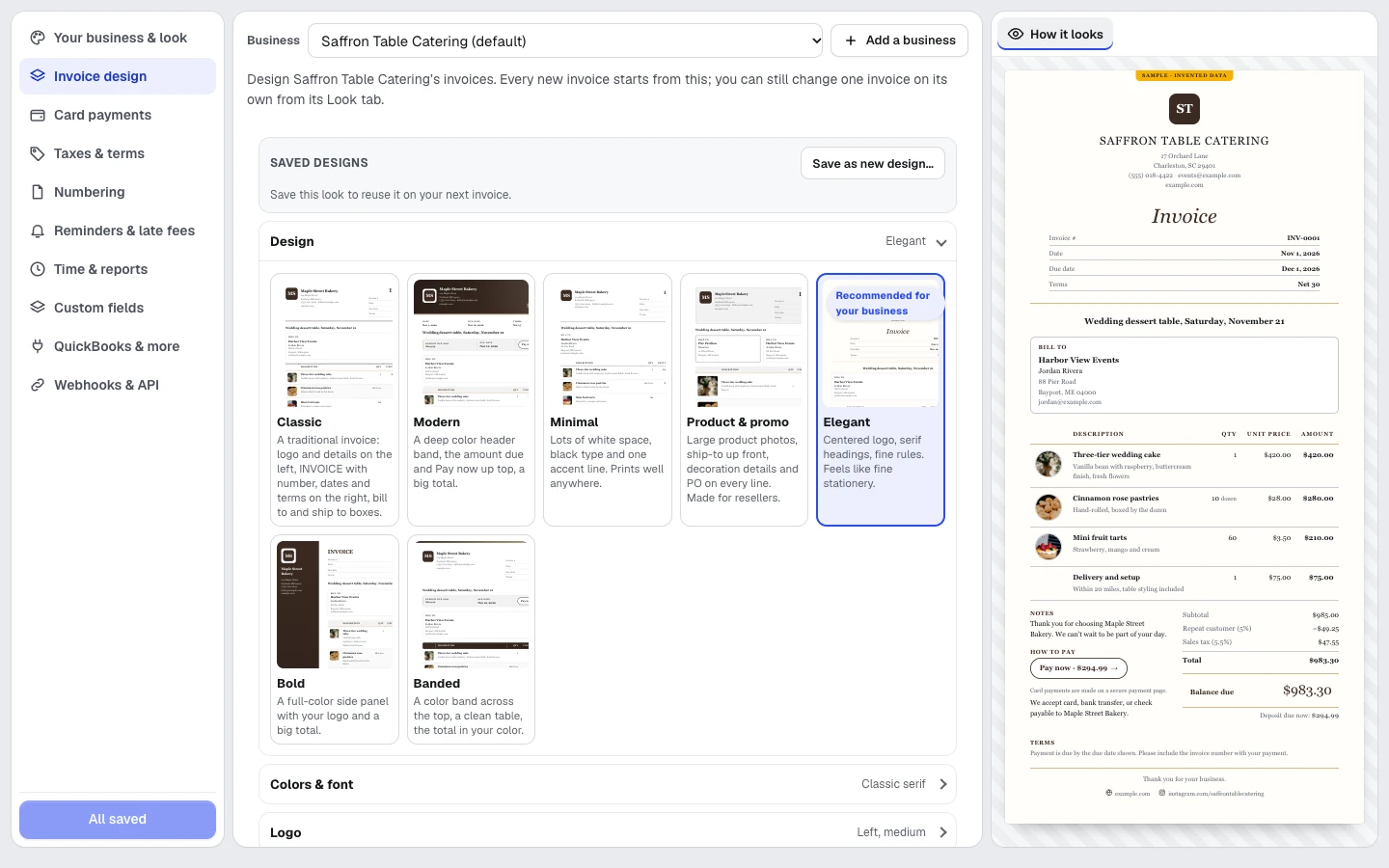
Design it your way, and watch it change
Pick a layout from real thumbnails and the invoice beside you updates as you click. Tell it your kind of business and it suggests the layout, the columns and fields like Job site address or Event date. Rename any heading, hide a section, reorder the columns, and save the look as a design to reuse.
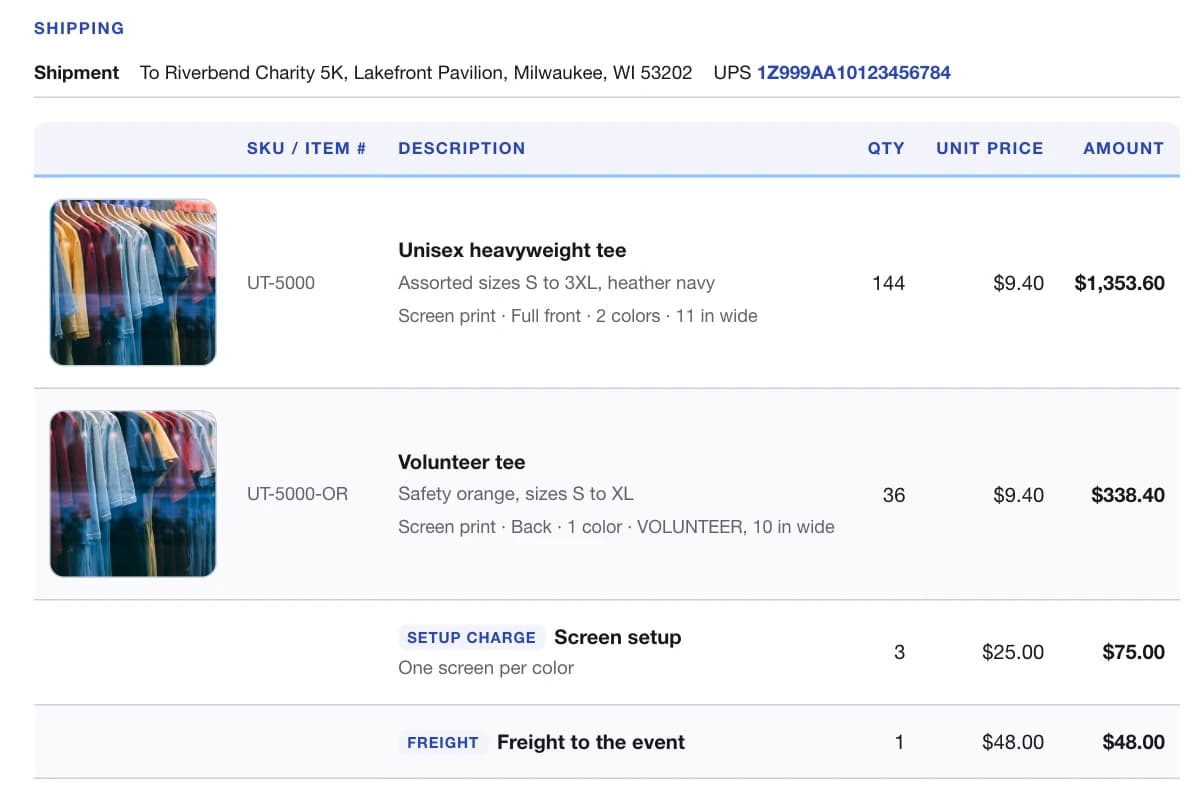
Product photos, SKUs and decoration on every line
Add a photo to any line, from your computer or your Graphics Library, with the SKU beside it. For printed and embroidered goods, each line carries its decoration: method, location, colors and size, printed under the item.
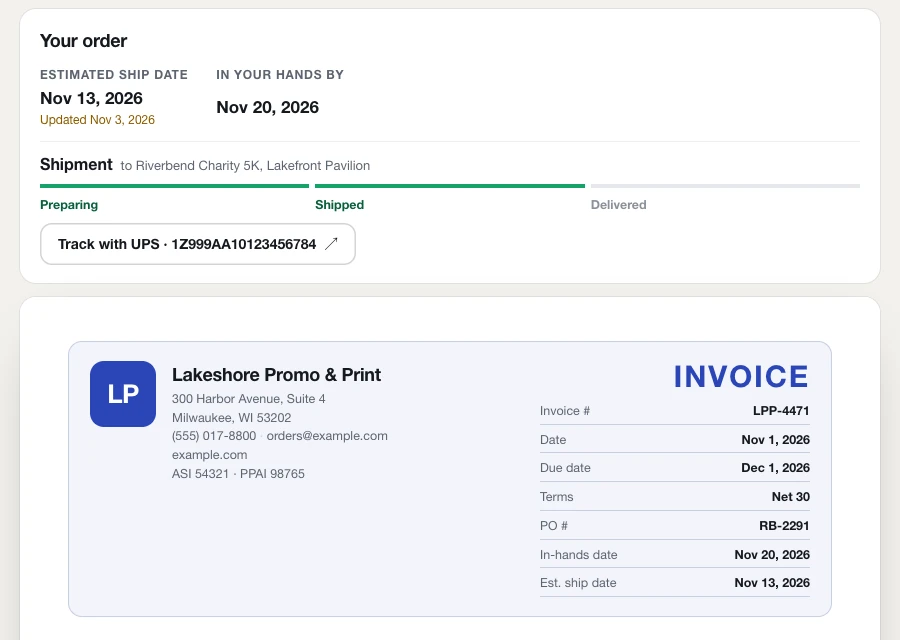
Ship dates and tracking on the customer's page
Set an estimated ship date and an in-hands date, add each shipment's carrier and tracking number, and your customer sees Preparing, Shipped and Delivered with a Track button. When you move the ship date, the page says when it was updated.
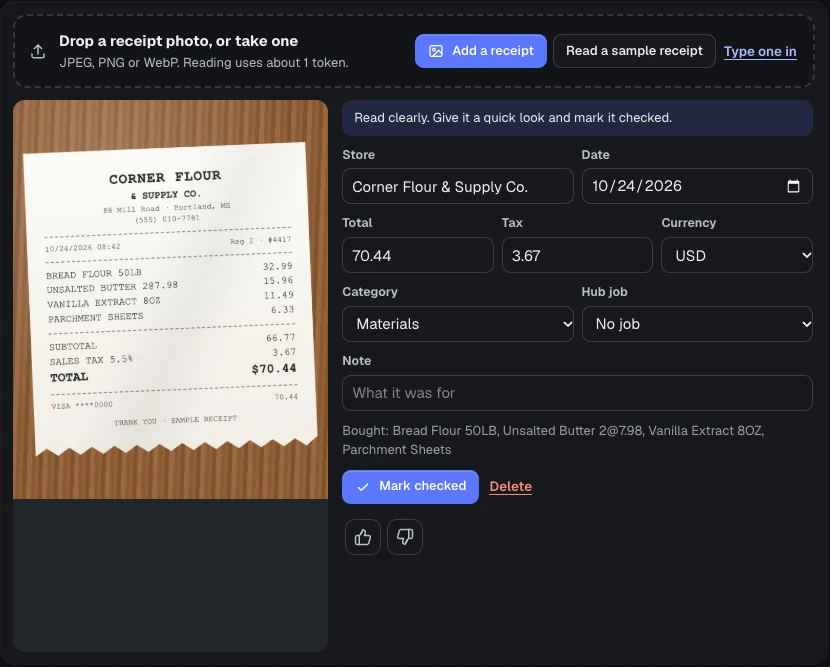
Receipts read from a photo
Snap a receipt and the store, date, total and tax fill in, with the fields it wasn't sure of highlighted for you to check. File it under a job and export a spreadsheet for your accountant.
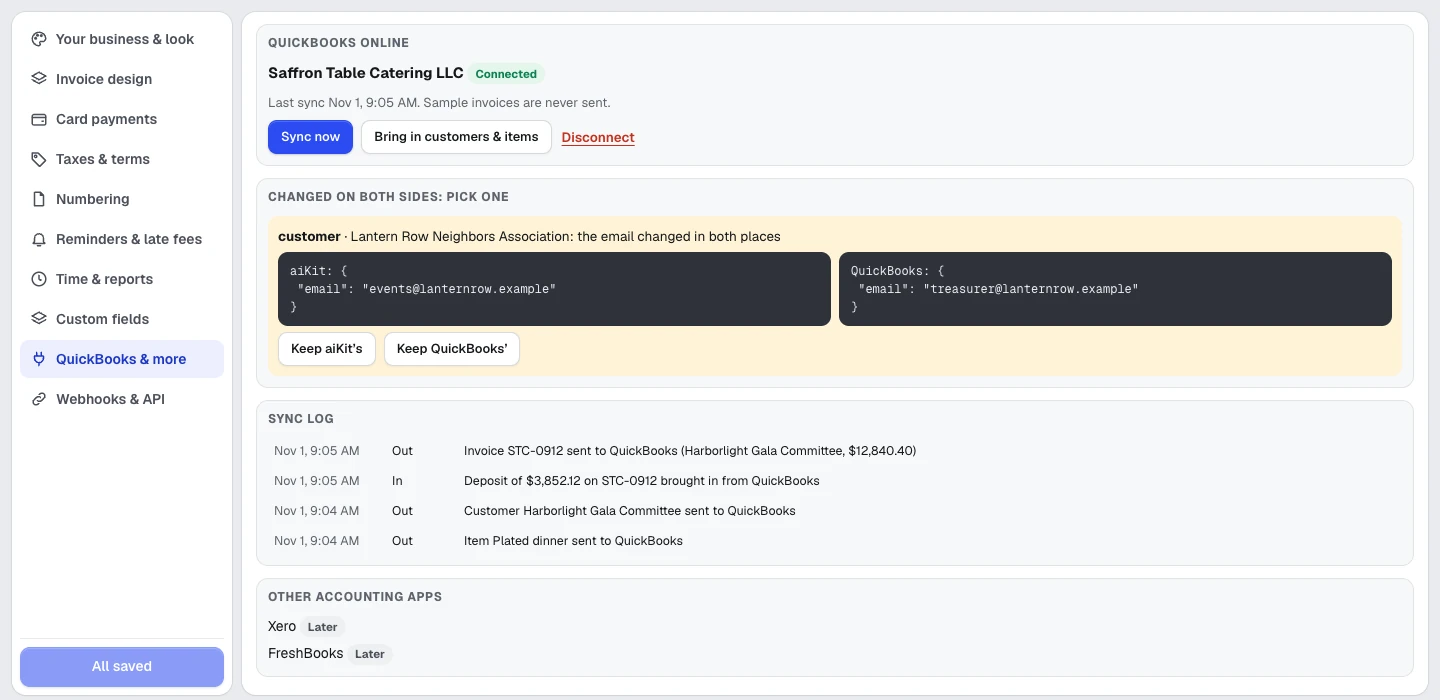
QuickBooks kept in step
Connect QuickBooks Online to send invoices, customers, items and payments there and bring payments recorded in QuickBooks back. Every sync is in a log, and anything changed on both sides waits for you to pick which one to keep. The connection switches on for every account once aiKit's QuickBooks app is approved.
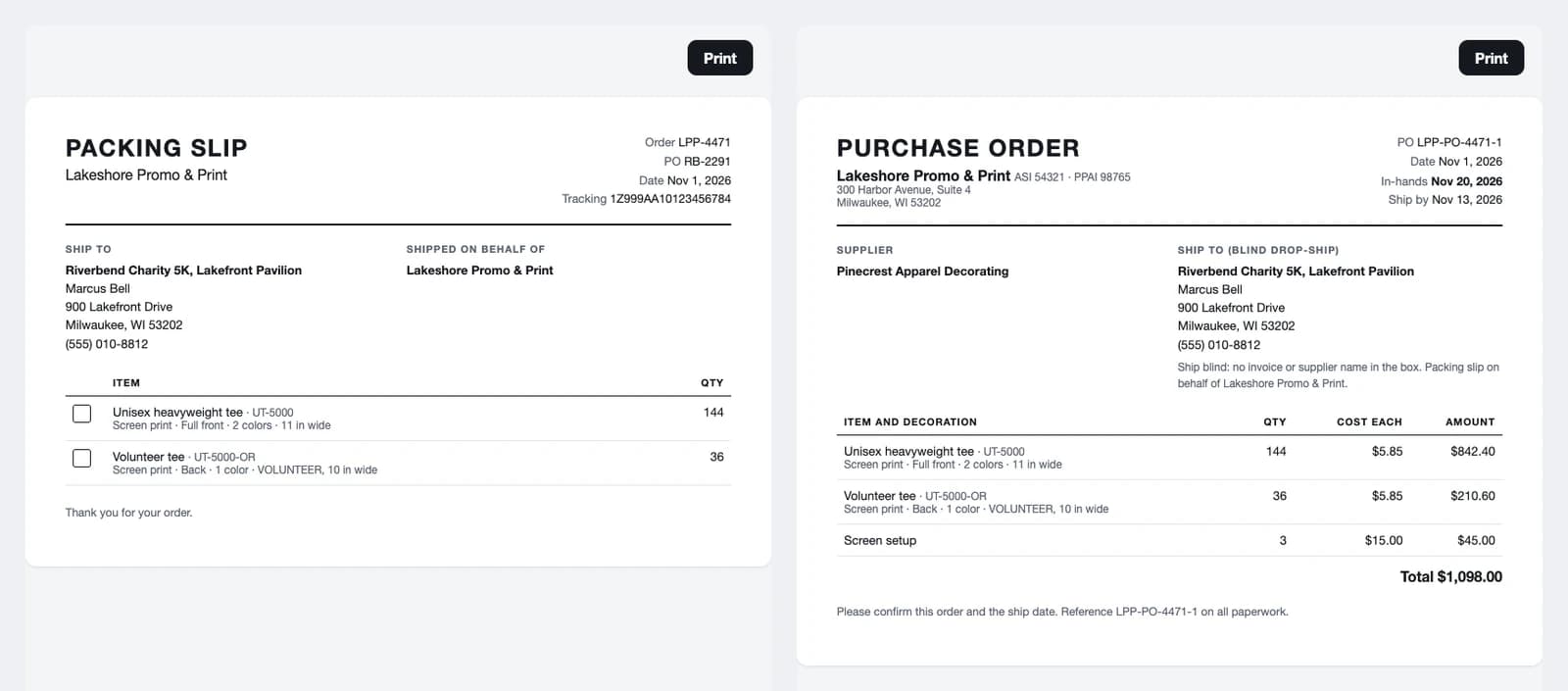
Made for promotional products and resellers
Print your ASI, SAGE or PPAI number, add the PO and in-hands date, and send each supplier a purchase order at your cost with the decoration details. Blind drop-ship? The packing slip shows no prices and names your company, not the supplier.
Money math you can trust
Line discounts, an invoice discount spread across the lines before tax, several tax rates on one line, shipping, fees and a deposit, all in whole cents with tax rounded once per rate.
Quote to invoice in one click
An accepted Quote Studio quote becomes an invoice with the customer's picks, totaling exactly what they accepted.
An invoice in three taps, by voice
On a phone: tap the customer, say "2 hours design at 85, delivery 25", press Send. The lines appear as you speak, and a line without a price is flagged instead of guessed.
Alle Funktionen
Alles in Invoices & Expenses
Die vollständige Liste, so wie das Tool heute funktioniert.
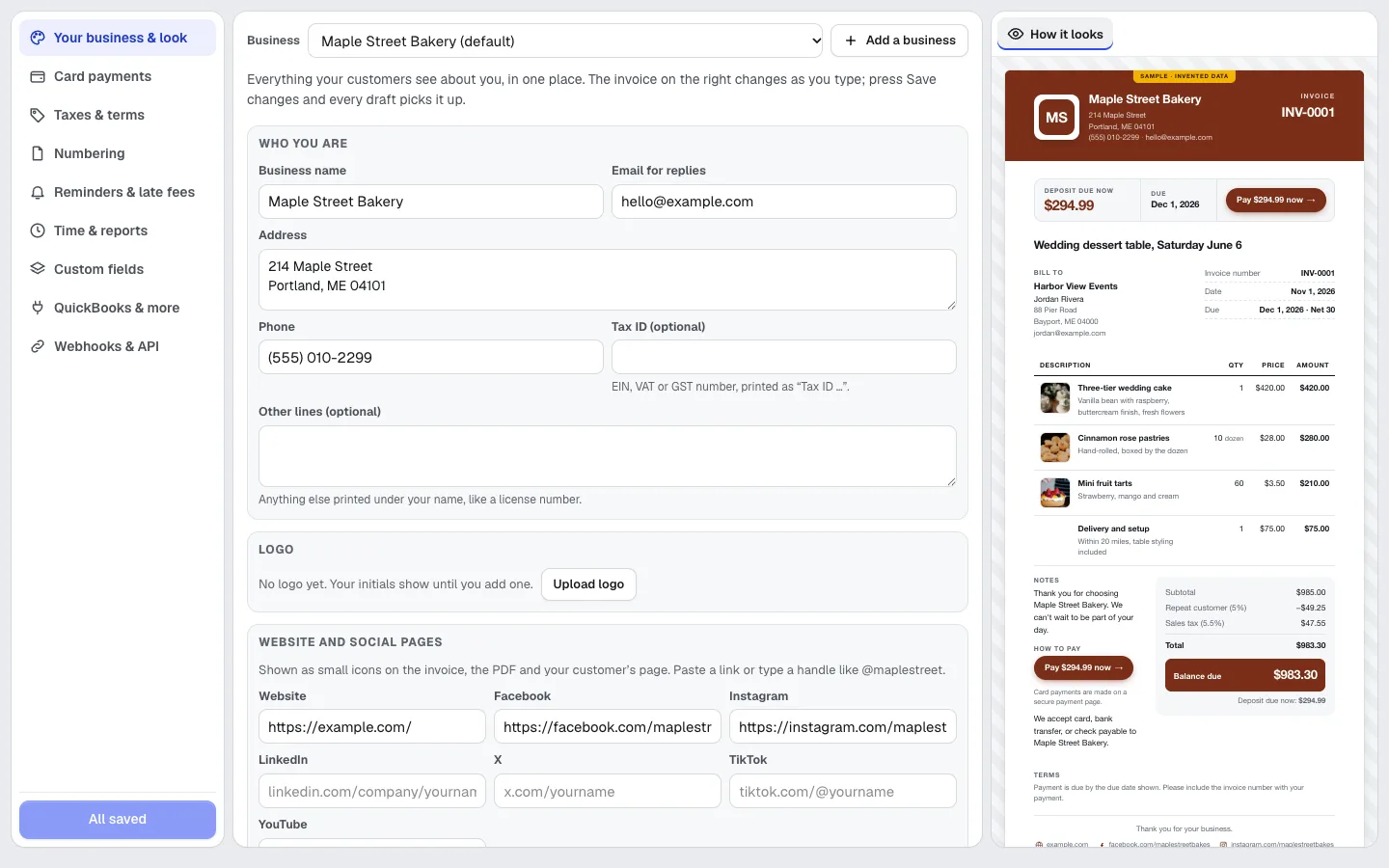
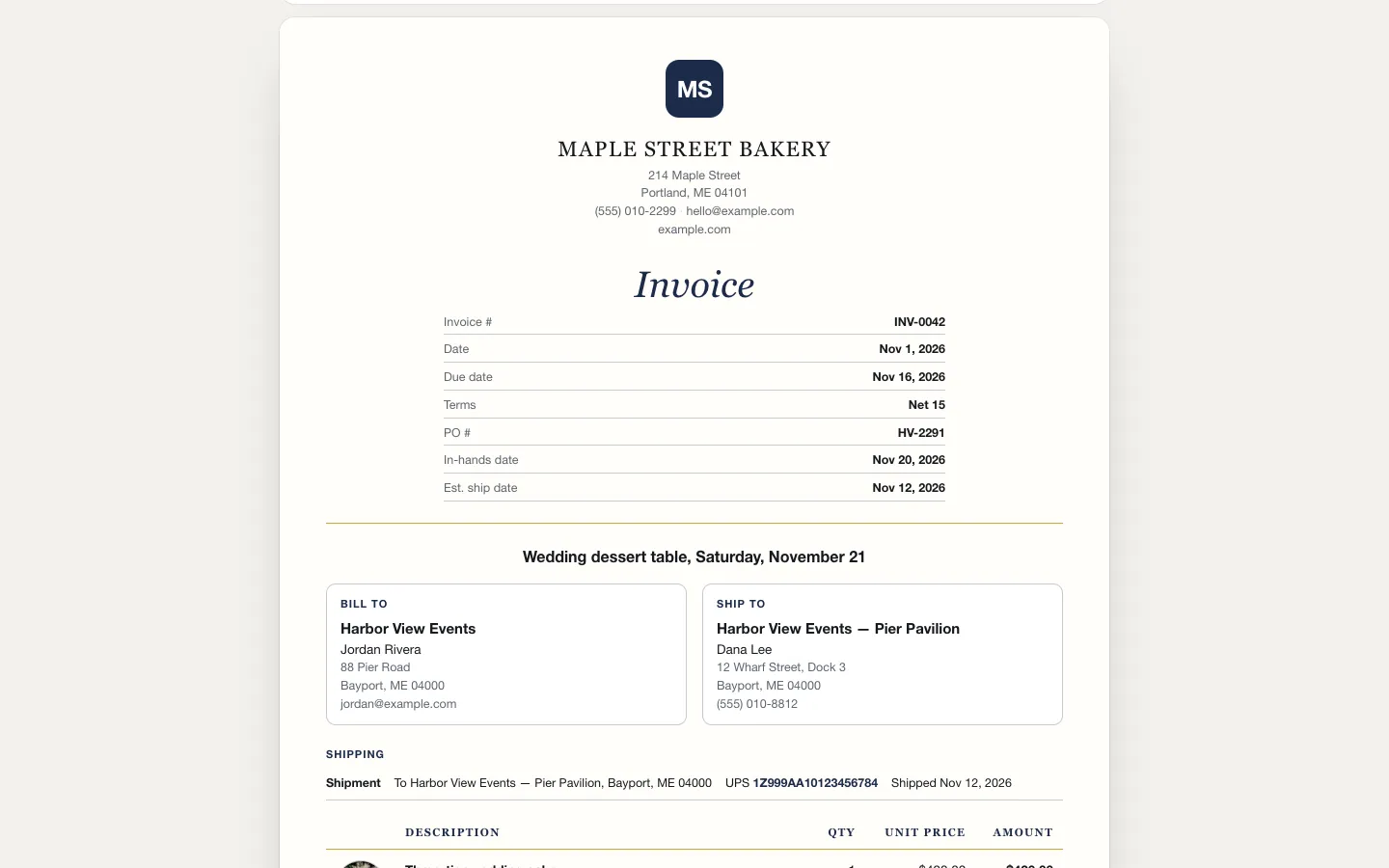
- Quick invoice on a phone in three taps: pick the customer, say or type the work ("2 hours design at 85, delivery 25"), Send
- Several businesses in one account, each with its own logo, look (seven layouts and Brand Kit colors), numbering, tax rates and payment terms
- Line items with quantity, unit price (to four decimals), line discounts, an invoice discount, shipping, several tax rates per line, fees, and a deposit
- A live page your customer opens on any phone: view, download the PDF, press Pay now, follow shipments with tracking links and the estimated ship date, and leave a review after paying if you turn that on
- Card payments through the account you already use (Stripe, PayPal, Square or Authorize.net): customers pay on that company's secure page and the invoice marks itself paid
- Seven layouts (Classic, Modern, Minimal, Product & promo, Elegant, Bold, Banded) and an invoice designer: show, hide, move and rename sections, columns and words, add your own fields, pick colors and fonts, and save designs
- Your business details in one place (address, phone, tax ID, logo, website and social links) with the invoice changing as you type, and product photos on lines from Quote Studio, the Graphics Library or an upload
- Ship-to apart from bill-to, several shipments per invoice, tracking numbers with the carrier found from the number, and printable packing slips
- Promo / reseller tools when you switch them on: decoration details and art proof per line, setup, run and freight charges, PO and in-hands date, ASI/SAGE/PPAI numbers, your cost and margin (never shown to customers), blind drop-ship slips and one-click supplier purchase orders
- A customer portal: one link where a customer sees all their invoices, their statement and a receipt for every payment
- Record full or part payments, credit notes you can apply to later invoices, and late fees worked out from your rule and added when you say
- A reminder schedule (before the due date, on it, and when late) that you approve once; nothing goes out without your approval
- Time and mileage: a timer and quick entries that turn into invoice lines in one press
- Products and services shared with Quote Studio, with prices, taxes and optional stock counts that go down when an invoice is sent
- One click turns an accepted Quote Studio quote into an invoice that totals exactly what the customer accepted
- Ask for changes in plain words ("add a 3% card fee", "make it net 15") and the invoice changes, with Undo
- Duplicate any invoice, pick several to send, mark paid, archive or export at once, and search and filters on every list
- Receipts read from a photo (store, date, total, tax, category), filed under a Hub job, exported as a spreadsheet
- Tax-time reports: profit and loss, sales tax collected, expenses by category, a contractor (1099) list, and one accountant file
- Customer statements, an aging report of who owes what, and every invoice linked to its Hub job
- QuickBooks Online: customers, items, invoices, credit notes and payments, with a sync log and a choice when something changed on both sides
- Spreadsheet import and export, webhooks when an invoice is sent, opened or paid, and an API that works with Zapier
Das ist enthalten
Das bietet Invoices & Expenses und so arbeitet es mit dem Rest von aiKit zusammen
Im kostenlosen aiKit-Konto enthalten
- Invoices, credit notes and the customer's live page, with no monthly count
- Several businesses with their own logo, colors, layout, social links and numbering
- Pay now by card through your own Stripe, PayPal, Square or Authorize.net account
- Seven designed layouts and product photos on invoice lines
- Payments, deposits, late fees, repeating invoices and reminder drafts
- Customers, items, statements and the aging report
- Spreadsheet import and export, webhooks and the API
Was KI nutzt und was kostenlos ist
Reading a receipt photo (about 1 token) and plain-words changes in Ask for changes (about 1 token each) use your account's monthly tokens, shared with every aiKit tool. Everything else uses no AI. Prices and tax rates come only from what you enter.
Funktioniert mit Ihren anderen aiKit-Tools
- Quote Studio: An accepted quote becomes an invoice in one click, totaling exactly what was accepted, and product photos saved in Quote Studio show on invoice lines.
- Graphics Library: Pick product photos for invoice lines straight from your Graphics Library.
- aiKit Hub: Every invoice and expense can be filed under a Hub job, and a Hub card can link an invoice and show its status.
- Brand Kit: Your Brand Kit's colors and logo dress every invoice.
- Reviews & customer photos: From a paid invoice, ask the customer for a review in Reviews.
Keep Invoices & Expenses in any of your kits, next to the tools you use with it. One monthly AI allowance covers every tool you add.
So funktioniert's
Vom ersten Klick bis zum fertigen Ergebnis in 5 Schritten.
Set up once
Your name, address, phone, logo, colors, social links and payment terms, all in one place, with the invoice changing beside you as you type. Or press Try it with sample data first.
Make the invoice
Pick a saved customer or type one, add lines or saved items, and choose the terms. The preview beside the editor is exactly what your customer sees.
Verschicken
Send makes the customer's live page. Copy the link, or open a ready email in your own mail app.
Get paid
Card payments through your connected account mark the invoice paid by themselves. Record checks and transfers by hand, apply a credit note, or add a late fee when one is due.
Keep the books in step
Sync with QuickBooks, export spreadsheets for your accountant, and see who owes what by how late it is.
Für wen es gedacht ist
Wie unterschiedliche Unternehmen Invoices & Expenses nutzen
 Handwerk & Dienstleistungsbetriebe
A contractor's labor and materials
A made-up home services company bills 4 hours of plumber labor, the water heater and fittings, with sales tax on the materials only and the job site address and work order number in the header.
 Druck, Werbeartikel & Schilder
A promo order from PO to tracking
A made-up promotional products company invoices 180 printed tees for a charity race with the customer's PO, the in-hands date, a separate ship-to, its ASI number and the UPS tracking, then sends its decorator a purchase order.
 Einzelhandel, Restaurants & E-Commerce
Wholesale orders with photos and SKUs
A made-up apparel brand invoices a general store's holiday restock with a product photo and SKU on every line, an opening-order discount and ground shipping.
 Handwerk & Dienstleistungsbetriebe
A med spa visit, paid at checkout
A made-up med spa sends an Elegant invoice due on receipt: a facial, a treatment billed per unit, an add-on and take-home skincare, with member savings taken off before tax.
 Kreative, Coaches und Berater
Hours for an accounting firm
A made-up CPA firm bills a tax return, bookkeeping cleanup and a notice response in hours on the Minimal layout, with its tax ID in the header and time billed in 6-minute steps.
 Marketing und Agenturen
A studio's project, phase by phase
A made-up design studio invoices a website and brand refresh by phase, with the project and phase in the header and 50% due now to start. The rest is due at launch from the same link.
 Events, Licht & AV
A catered dinner for 120 guests
A made-up catering company bills appetizers, a plated dinner and dessert per guest with food photos, adds service staff by the hour and asks for a 30% deposit, with the event date and headcount up top.
Ideal für
- Service businesses and contractors who bill after the job, or take a deposit first
- Shops and makers who invoice regular customers every month
- Anyone who keeps receipts in a shoebox for the accountant
Gut zu wissen
- Nicht geeignet für: Holding card details: customers pay on your processor's own secure page, never inside aiKit
- Nicht geeignet für: Payroll, bank reconciliation or tax filing; that stays in your accounting app
- aiKit never holds card numbers: Pay now opens your own processor's secure checkout (or your own payment link). Each processor shows Coming soon until it is switched on for your aiKit server.
- Tracking shows the carrier's own tracking page by link; live delivery status inside aiKit is not built yet, so you mark a shipment delivered.
- Reminders wait for your approval; sending them by email from aiKit is switched on per server, otherwise you copy them or open them in your own email.
- Taxes are the rates you enter; aiKit doesn't look them up. QuickBooks companies outside the US need their tax codes matched by hand for now.
- QuickBooks connection is switched on per server; until then the button says Coming soon.
Fragen
Invoices & Expenses: Fragen, die Leute stellen
Is there an invoicing app with a customer portal and time tracking?
Can my customers pay an invoice by credit card?
Can one invoice line have more than one sales tax?
How do I turn an accepted quote into an invoice?
Is there free invoicing software that reads receipts from a photo?
How do I send an invoice with aiKit?
Can my invoices show my logo, colors and layout?
Can customers pay my invoices by credit card?
Can I add a ship-to address and tracking numbers to an invoice?
Does aiKit have invoicing for promotional products distributors?
Can I design my own invoice layout?
How do partial payments, deposits and credit notes work?
Does Invoices & Expenses send payment reminders and add late fees?
Can I connect Invoices & Expenses to QuickBooks?
Can I make an invoice on my phone by talking?
Passt gut zu
Tools für dasselbe Kit
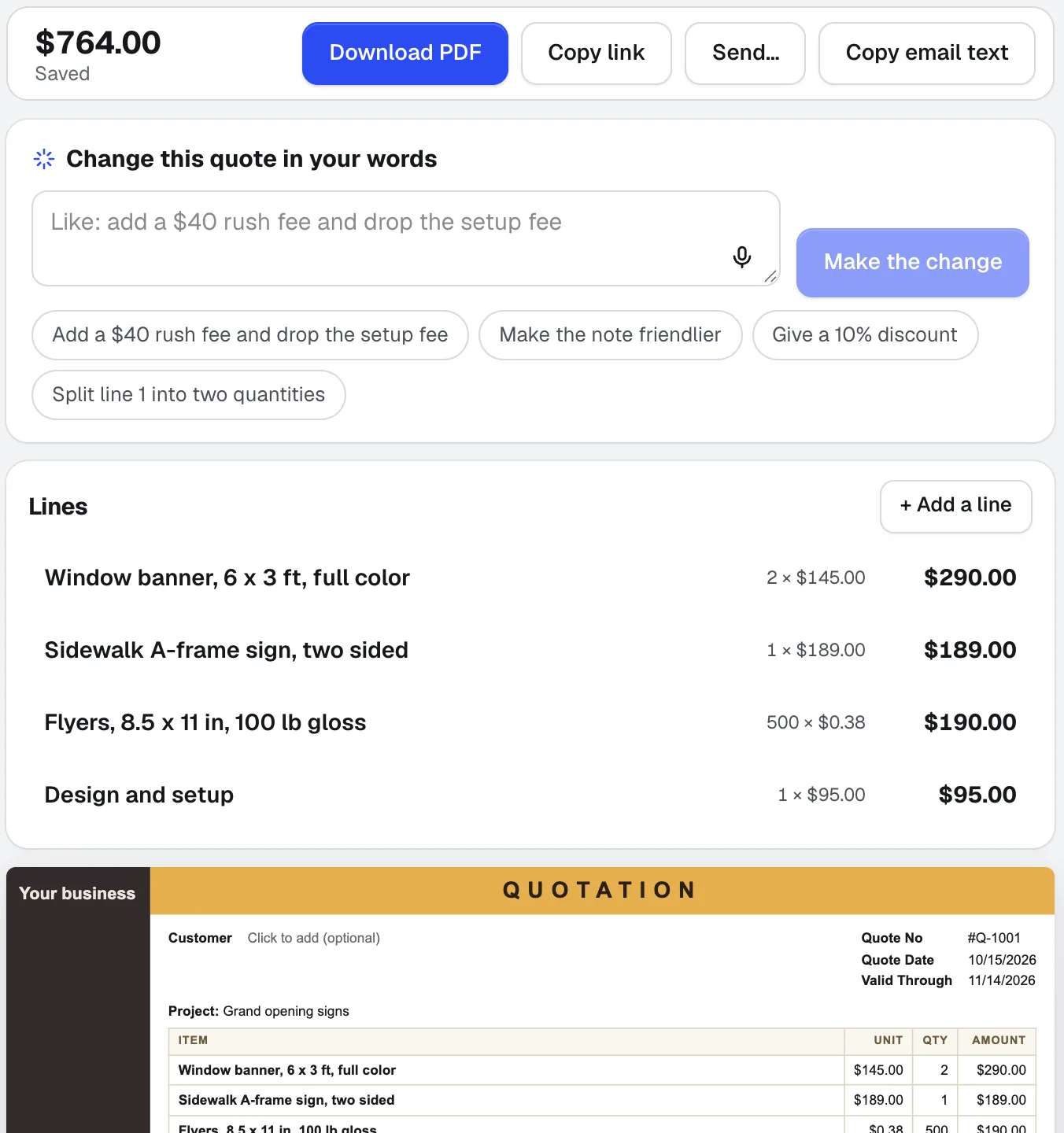
Quote Studio
NeuFüge eine E-Mail eines Kunden ein, diktiere den Auftrag oder füge ein Foto einer handschriftlichen Liste hinzu. Quote Studio ist Angebotssoftware, die ein einseitiges Angebot nur mit deinen eigenen Preisen entwirft; dann lädst du das PDF herunter oder sendest eine Live-Seite, die dein Kunde online annehmen kann.
aiKit Hub
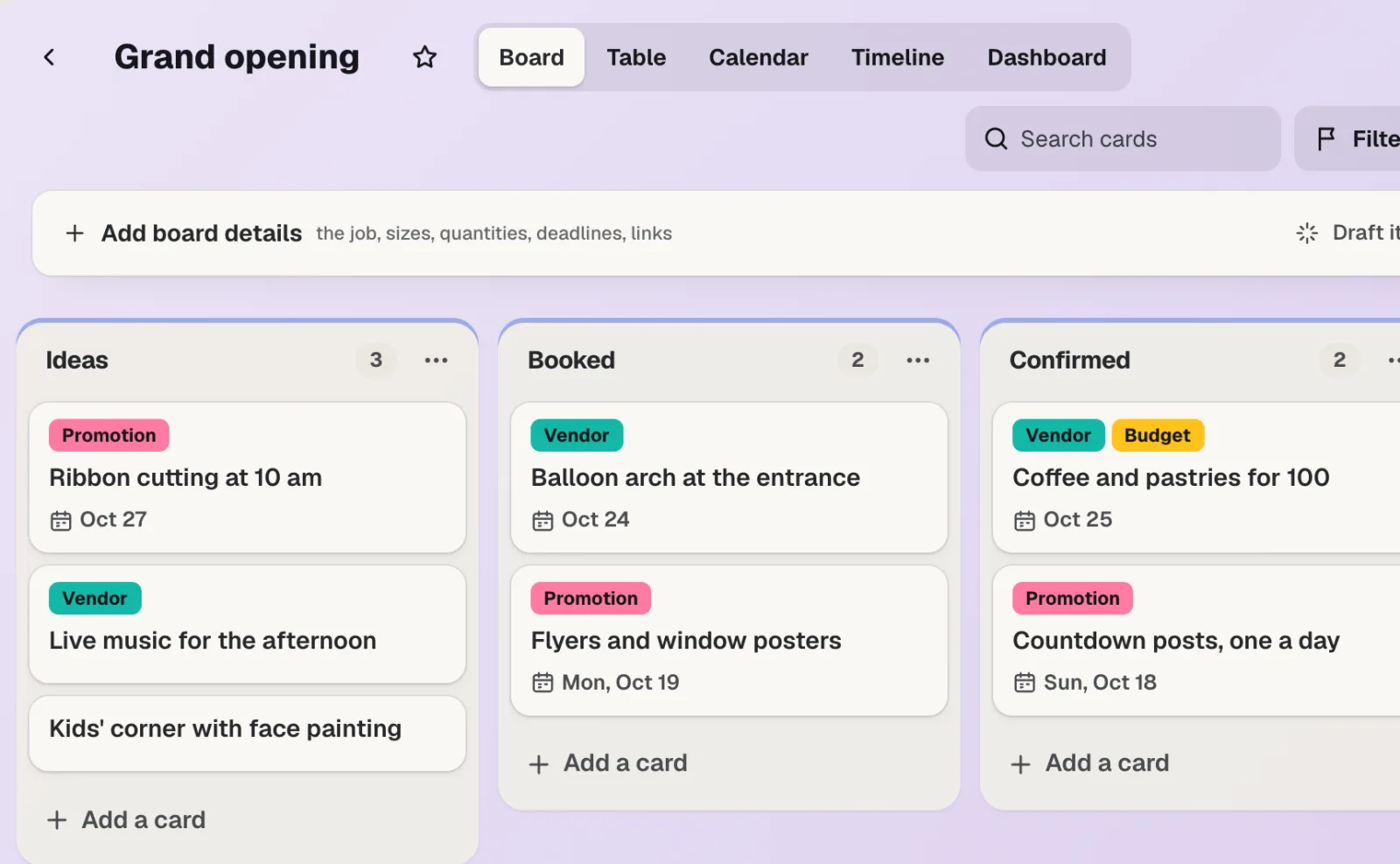
NeuaiKit Hub ist Software für Kundenprojektmanagement: To-do-Listen, die sich in Boards verwandeln lassen, Nachrichten, Chat, ein gemeinsamer Terminkalender, Dokumente und Dateien sowie eine Kundenansicht, die nur zeigt, was Sie auswählen. Ihre Angebote, Kundenproofs, Buchungen und Website-Anfragen liegen auf den Karten, zu denen sie gehören.
Reviews & customer photos
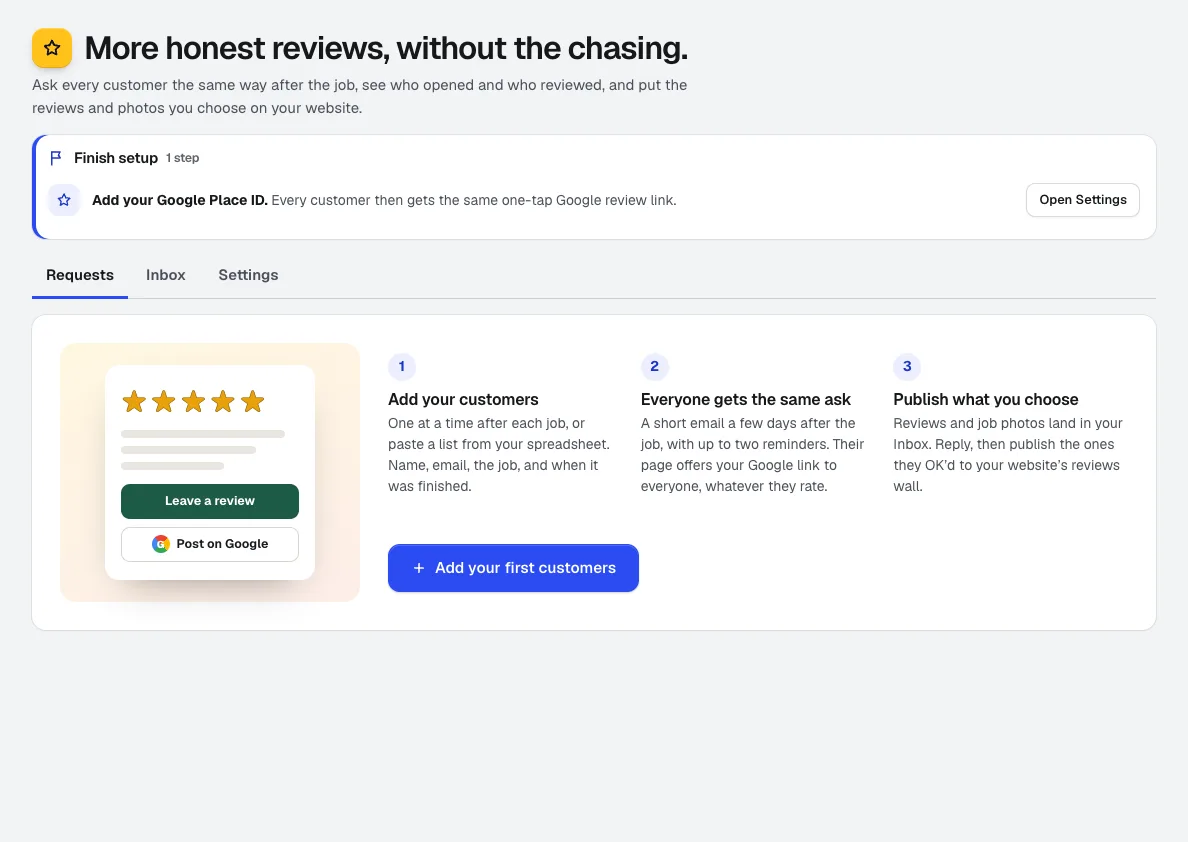
NeuMehr Google-Bewertungen sammeln: Fügen Sie Kunden nach dem Auftrag hinzu, und Bewertungen fragt sie termingerecht an, verfolgt, wer geöffnet, besucht und bewertet hat, sammelt Auftragsfotos und zeigt die von Ihnen ausgewählten Bewertungen auf Ihrer aiKit-Website.
Nutzen Sie Invoices & Expenses heute.
Erstellen Sie ein kostenloses aiKit-Konto und öffnen Sie Invoices & Expenses sowie alle anderen Tools in Ihrem Kit.
Seite zuletzt am 2026-11-01 mit dem Produkt abgeglichen.