Skip to content
Start free

Gobo Proof StudioEarly access

From a customer's logo to an approved gobo and a print-ready file

Gobo Proof Studio handles custom gobo design from a customer's logo: it checks the file, makes the gobo the way you ask, sizes it for the real room, and sends your customer a proof to approve from their phone. It is in early access, not yet open to every account while it is tested.

In early access: open to a small group of accounts while it is tested.
aiKit · Gobo Proof StudioExample
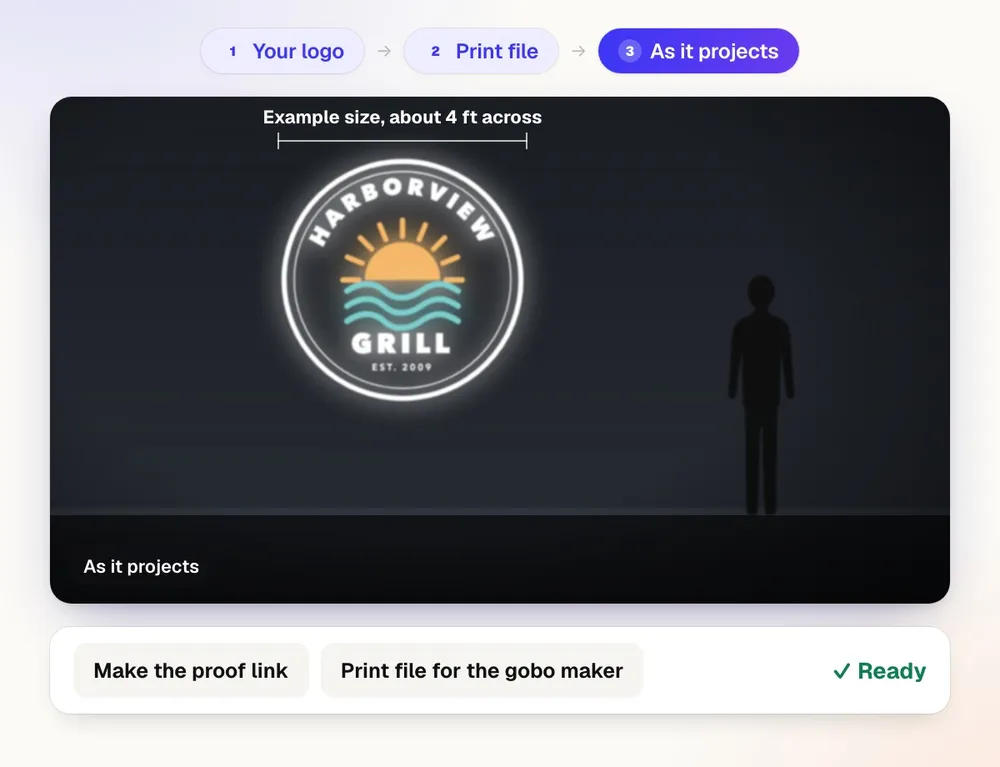
Gobo Proof Studio turning a grill's color logo into a print file on a flat black disc, then showing it as it projects on a dark wall

What you get

Turn a customer's logo into a gobo proof they approve from their phone and a print-ready file for the gobo maker, sized for the real room.

Resolution checked before any work

Every file is graded against the gobo size (600 dpi across the disc) as High, Good, Marginal, Low but usable, Low, or Vector. A file that would be enlarged more than 2 times stops and asks how to go on.

An artist you talk to

Type changes the way you'd tell a designer: "change the red to PMS 286 and remove the tagline." Nothing changes unless someone asked, and it asks one question first when your words could mean two different proofs.

Sized for the real room

Enter the mounting distance, the exact width and height it must land at, and the lens. The art is made at exactly that scale, even on a floor at an angle like a crosswalk, and the proof says what it lands at: Projects 10 ft × 4 ft at 25 ft. If the lens won't reach that size, it says so and offers a lens or distance that works.

A print file the gobo maker can use

Print-ready CMYK PDF on a flat black background, the page exactly the gobo's outside diameter, at 600 dpi (1200 dpi from vector or very sharp art).

Several designs, one customer link

Up to 12 logo files per upload, message gobos like "Happy Hour," and full-color plus lettering-only versions. One private link lets your customer approve each design on its own.

Your logo, a reseller's, or none

Set the proof's branding at any time, even after the proof is sent: your logo, another company's name and logo, or a plain white-label proof with no company on it. Only the proof is drawn again; the print file stays the same. Proofs download at 300 dpi.

What’s included

What you get with Gobo Proof Studio, and how it works with the rest of aiKit

Included with a free aiKit account

  • Early access: not yet open to every account while it is tested
  • Gobo jobs aren't counted against a monthly number during early access
  • Up to 12 logo files per job, up to 60 MB each
  • Round gobos at 37.5, 53, 54, or 86 mm, or any size you enter
  • A CMYK print-ready PDF and a proof link your customer approves from a phone
  • Recently deleted keeps jobs and designs for 30 days

What uses AI, and what’s free

An AI artist reads the logo and your words and makes each version; that is the AI step. The resolution check, the sizing on the disc, and the projection calculator are measured math, not AI. While Gobo Proof Studio is in early access, its jobs aren't counted against a monthly number.

Works with your other aiKit tools

Keep Gobo Proof Studio in any of your kits, next to the tools you use with it. One monthly AI allowance covers every tool you add.

How it works

From first click to finished, in 5 steps.

  1. Start the job

    Name the job, add your job number and client, and pick the gobo size: 37.5 mm (the default), 53 mm, 54 mm, 86 mm, or another size.

  2. Add the room (optional) and the logo files

    Enter the distance, the width and height it should land at, and the lens. Drop the client's files: PNG, JPG, SVG, PDF, AI, EPS, and more, up to 60 MB each.

  3. Say what to change

    "Make the black parts dark gray." The first proof already follows your words. Left empty, a white background usually turns black so only the logo projects.

  4. Check the proof and how it projects

    See the customer proof, an As it projects view on a dark floor, and the print file on its black disc. Zoom up to 8 times to check thin lines and small text.

  5. Send the link and download the files

    Make the proof link and send it in your own email or text. Download the CMYK print PDF, the proof, or the whole job as a ZIP.

Who it’s for

How different businesses use Gobo Proof Studio

Events, lighting & AV

A wedding monogram on the dance floor

A lighting company gets a couple's monogram as a phone photo. The check grades it Low, the artist redraws it as clean shapes, and the proof shows it 6 ft wide from a 20 ft mount.

Retail, restaurants & e-commerce

Message gobos for the patio

A restaurant asks for gobos that say Happy Hour and Taco Tuesday along with its logo gobo. Each phrase becomes its own design in the same job, in a color that goes with the logo.

Print, promo & signs

A sheet of three logos from one client

Harbor Line Print Co. receives one PDF with three logo versions. Each becomes its own design, cut from the sheet, with its own proof and print file, and the client approves all three from one link.

Real estate

A logo on the sidewalk outside an open house

A brokerage wants its logo projected at the entrance. The calculator says the standard lens tops out short of the size, and offers the lens or the distance that works.

Good to know

Before you use Gobo Proof Studio

Check before you print. Colors on screen will not match print, and sizes, bleed, resolution, spelling, and cut lines can be wrong. Open the file at actual size, read every word, and approve your printer's own proof first. aiKit cannot guarantee how it prints.

Questions

Gobo Proof Studio: questions people ask

Is there software for custom gobo design and customer approval?
Yes. aiKit Gobo Proof Studio is built for custom gobo design: you add the logo your customer sent, up to 12 files at 60 MB each, and say what the gobo needs in plain words. It checks resolution first, makes the gobo on a round disc at your size, and gives you a CMYK print file for the gobo maker plus a custom gobo proof your customer approves from a phone with no account. A projection calculator sizes the art for the real mounting distance and lens. Gobo Proof Studio is in early access: it is not yet open to every account while it is tested.
Who can use Gobo Proof Studio right now?
Gobo Proof Studio is in early access. It is not yet open to every account while it is tested, and other accounts don't see it in their tools. This page describes what those accounts use today, checked against the tool itself. During early access, gobo jobs aren't counted against a monthly number. Everything else for print work in aiKit is open to every account: Printer’s Helper for print-ready files and file checks, and Customer Proofs for approvals on any design, video, or web page. A free aiKit account needs no card.
What file does the gobo maker get from Gobo Proof Studio?
A CMYK gobo print file: a print-ready PDF with a flat black background, exactly the size of the gobo. In aiKit Gobo Proof Studio the art sits on a round disc at the size you chose and fills 92% of it, or 98% when the art is itself round, like a badge. A white background usually becomes black so only the logo projects, and colors change only when you or your customer ask. Each finished version shows three views: Customer proof, As it projects, and Print file. Your customer sees only the proofs, never the print file, and every job keeps the client's original, every version, the print file, and the proof.
Can a gobo land at an exact size on a floor at an angle, like a crosswalk?
Yes. A projector shining down at an angle stretches the image front to back and makes the far edge wider. In aiKit Gobo Proof Studio you choose Floor, at an angle and enter the lens height; the art is pre-shaped on the gobo so it lands at the exact size you entered, for example crosswalk stripes 10 ft × 4 ft from 25 ft with the lens 15 ft up. The proof and the customer's link say Projects 10 ft × 4 ft at 25 ft and note the angle, so the size can be checked before anyone approves.
What gobo sizes does Gobo Proof Studio make?
aiKit Gobo Proof Studio makes round gobos at 37.5 mm by default, and at 53, 54, or 86 mm, or any size you enter for your gobo maker. The art fills 92% of the disc, or 98% when the art is itself round. The size also sets the resolution the logo needs: the check works from 600 dots per inch, so a 37.5 mm gobo needs about 850 pixels across, and a larger gobo needs more. To size the art for a room, the built-in gobo size calculator takes the mounting distance, the exact width and/or height the art must land at, and a lens from 1:0.15 to 1:1.3 (written 1:0.33, or as a throw ratio like 3.0:1), and shows its math.
How does Gobo Proof Studio turn a logo into gobo artwork?
A gobo job means knocking out the background, recoloring the logo, placing it on a circle at the right size, working out the projected size, and making a proof and a print file. aiKit Gobo Proof Studio does those steps from your words: it grades the logo's resolution before anything else, makes the gobo the way you ask, asks one short question when a request could mean two things, shows the math for the room, and keeps the proof, the print file, and every version in one job. Your customer approves from a private link, and nothing reaches the gobo maker until you download the file and send it.
Does Gobo Proof Studio work with other aiKit tools?
Yes, in two places. Save to Graphics keeps a version's pictures in your aiKit Graphics Library: the customer proof, the As it projects mock-up, or the print file on flat black, filed under the job's client when that client is also in Graphics. And on an aiKit Hub board, a card can link a gobo job, so the job's status shows on the card where your team tracks the order. Gobo Proof Studio sends its own proof link, one link for every design in the job, rather than going through Customer Proofs.
Can I find an old gobo job by my own job number?
Yes. Every job in aiKit Gobo Proof Studio is organized by client and searchable by your own job number, so a reorder or a change months later starts from the right file. Each job keeps the client's original files, every version the gobo artist made, the print-ready file, and the proof, and Show this one brings back any earlier version to work from. A job or a single design you delete waits under Recently deleted for 30 days, where it can be restored, and is then removed for good.
Does Gobo Proof Studio use AI, and how are jobs counted?
Yes. In aiKit Gobo Proof Studio an AI artist reads every file and your words and makes the gobo the way you asked, then answers each request with what it made and what it changed. The resolution check, the sizing on the disc, and the projection math are measured, not guessed. During early access, gobo jobs aren't counted against a monthly number. Every version stays under Versions, so a change that isn't what you wanted is one click from undone, and a thumbs down on any result tells the aiKit team what went wrong.
What should I check on a gobo proof before ordering?
Open the file at actual size and read every word and edge. Check that the design fits the room size, that thin parts will hold together when cut, and that the maker's own proof matches. Screen colors and shapes can differ from the finished gobo, so approve the maker's proof before you order.
What is aiKit Gobo Proof Studio?
Gobo Proof Studio is in early access and not yet open to every account. It turns the logo a customer sends for a custom gobo (the small disc a logo projector shines through) into a proof the customer approves from their phone and a print-ready file for the gobo maker. It works like a gobo artist you talk to: each upload is checked for resolution first, then the AI artist looks at every file and reads your words, and makes the gobo the way you asked. Nothing is changed on its own: a white background usually becomes black so only the logo projects, and colors change only when you or your customer ask. When something is unclear, like what color a black logo on white should be, it asks before making anything. The art is placed on a round gobo at your size (37.5 mm by default; 53, 54, 86 mm, or any size you enter), filling 92% of the disc (98% when the art is itself round, like a badge). The print-ready file is a CMYK PDF with a flat black background, exactly the gobo's size. The proof shows the gobo, the sizes, and one mock-up, As it projects. Every job keeps the client's original, every version, the print file, and the proof, organized by client and searchable by your own job number.
What happens when a customer sends several logos in one file?
In Gobo Proof Studio (coming soon for most accounts), the AI artist looks at the whole file before making anything. Several logos on one sheet (or one per page of a PDF) are each made as their own design in the same job, cut from the sheet, each with its own proof, versions, and print-ready file, unless your words say otherwise (for example, make the whole sheet one gobo). One customer link still shows every design. An icon with its own words counts as one logo. If it isn't clear what you want, it asks first.
Can I send a new logo file or a reference picture after I see a gobo proof?
Yes. In Gobo Proof Studio (coming soon for most accounts), the Request a change or add files box sits right under every finished proof (it opens as soon as the proof is ready). With several designs in the job, pick All designs (your words decide which ones change; logo 2 means Design 2 as the Proofs cards are numbered) or one design, or use the Change this one box on that design's card; designs you don't name stay exactly as they are. Add files with the Add files button, by dropping them on the box, or by pasting a picture; each file shows its upload progress. Then say in your words what each file is for, like use this new logo file or match the red in this photo: the AI artist looks at the files with your words and makes the next version. A request with files needs words. Every original stays under The client's files (all of the job's uploads, as pictures) and every added file under Files in this design, with downloads, so you can always see what a proof was made from. Earlier files and versions are never replaced or lost.
Can I take my logo off a gobo proof, or put a reseller's name on it, after the proof is made?
Yes. In Gobo Proof Studio (coming soon for most accounts), Branding on the customer proof sits right under the proof and can be changed at any time, also after the proof link went out. Your logo uses your Shop profile's logo and name. Another company puts a reseller's or client's name on it, picked from your saved companies or typed in, with an optional logo (PNG, JPEG, or SVG). No logo makes a plain white-label proof: no logo or company name on the sheet, on the customer's proof page, in the PDF's file properties, or in the file names. Only the customer proof is drawn again, with no AI and no charge; the print file stays exactly the same. Tick Start every new job with No logo and every new job starts white label. The proof image and PDF you download are 300 dpi on an 11 × 7.33 in sheet (3300 × 2200 pixels), sharp enough to send to a vendor.
How does Gobo Proof Studio handle a low-resolution logo?
In Gobo Proof Studio, coming soon for most accounts, the resolution check runs before anything else. It works from 600 dots per inch across 96% of the disc (a little more than the art really uses, to be safe), so a 37.5 mm gobo needs about 850 pixels across. Each file gets a grade (High, Good, Marginal, Low but usable, or Low; vector files are graded Vector). If a file would be enlarged more than 2 times, nothing is made until you choose: go ahead anyway (often fine for a bold, simple design), redraw it as clean shapes, ask the client for a better file, or upload a better file now. The first file stays on the job either way. While it waits, nothing is running, so there is no spinner: the design's card shows your file with an amber ring and a Waiting for your choice badge, the jobs list says Waiting for your choice: go ahead, redraw it as clean shapes, or get a better file, and instructions you typed say they start after you choose.

Use Gobo Proof Studio today.

Make a free aiKit account and open Gobo Proof Studio, plus every other tool in your kit.

Page last checked against the product on 2026-10-23.