

Voice KitYour voice
Make an AI voice that sounds like you, then use it everywhere
Record about a minute, confirm it is your own voice, and aiKit makes an AI voice of you. Read scripts, ads and animation voiceovers in it, fix any line and hear only that line again, and see the tokens before anything runs.
Free account, no card. Already using aiKit? Log in to open Voice Kit
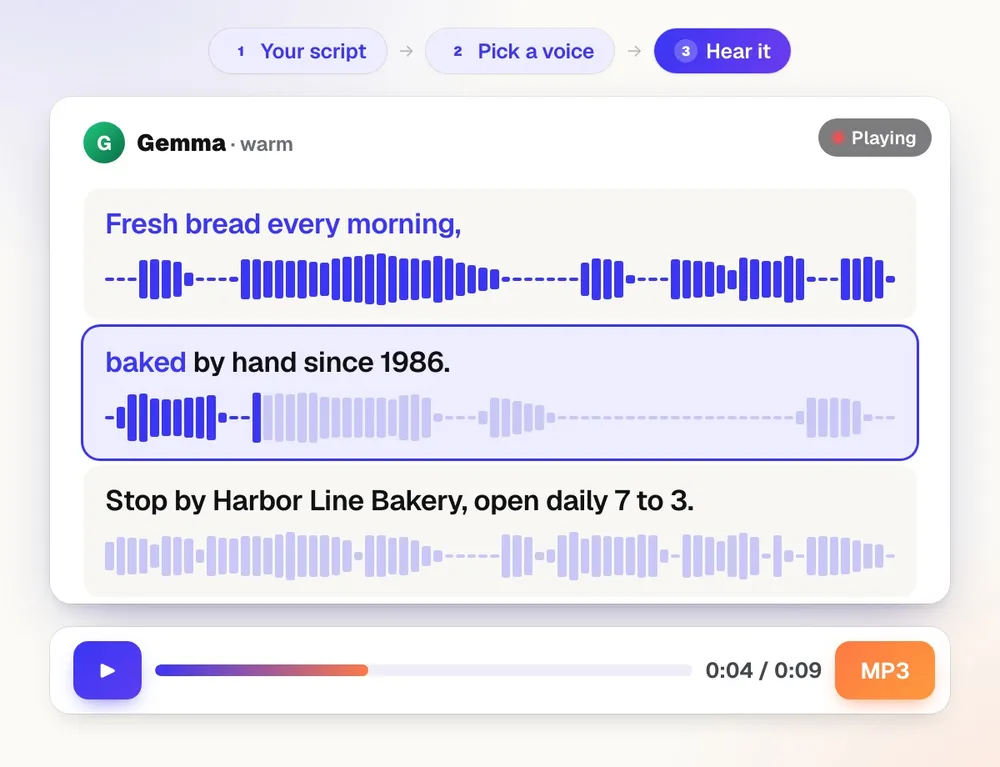
What you get
Make an AI voice that sounds like you from about a minute of your own recording, then use it for voiceovers, ads, videos and animations.
Your own voice, made in a few minutes
Read one consent sentence, record 1 to 2 minutes of yourself (at least 30 seconds), and aiKit checks it is the same person before it makes a voice that reads any script. Only your own voice is allowed.
My voice is the first choice in every tool that speaks
Scene Studio, Writing Pack, Video Kit, Presentation Builder and Motion Maker list My voice at the top. Pick it once and it reads your scripts, ads, animation voiceovers and narration.
Hand the result to the next tool
Each result ends with a What's next? row: read a script in your voice, put it in a video, add music. The words or the voiceover arrive in the next tool ready, with nothing to upload again.
Fix one line, not the whole take
Each paragraph is its own line. Change a word and press Read the changed lines: only those are read again, so edits are quick and cost little.
Scripts that fit the time
The AI writer fits a script to 15, 30, 60 or 90 seconds, or any length you type, in your Brand Voice. Parts you didn't ask about stay exactly as they were.
Never makes up your facts
When a script needs a price or phone number you didn't give, the writer leaves a placeholder for you to fill in, and Undo puts the script back.
Bring in words you already have
Import a Word file, PDF, text, Markdown or HTML file up to 4 MB, a web page, or a Writing Pack draft. Each paragraph becomes a line.
Twelve languages
Ask the writer to translate the script into Spanish, French, German, Portuguese, Italian, Dutch, Polish, Japanese, Chinese, Korean, Hindi or English, then read it in that language.
Dozens of voices to choose from
Pick from a library of stock AI voices, hear a short sample of each with its play button, and set a feeling, pace and voice for every paragraph. aiKit's own voice is listed first.
Straight into your animation
Use in Motion Maker puts the voiceover on its own track with the music dipping while it speaks. Or download MP3 or WAV, or save it to your Graphics Library.
Every feature
Everything in Voice Kit
The complete list, from the tool as it works today.
- Your own AI voice from 1 to 2 minutes of recordings and a consent sentence you read aloud, checked to be the same voice, then picked first in Scene Studio, Writing Pack, Video Kit, Presentation Builder and Motion Maker
- Stock voices, ready now
- A script editor line by line: AI writes it in your Brand Voice, fits it to 15, 30, 60, or 90 seconds, translates it, or makes any change you ask for in plain words
- Import from a Word file, PDF, web page, or Writing Pack draft
- Part by part: play any part (with Pause), redo just that part, change its words, click the exact word to fix its pronunciation, stress, or pauses, and Play all in order
- Download MP3 or WAV, save it to the Graphics Library, or use it in Motion Maker with the music dipping under it
What’s included
What you get with Voice Kit, and how it works with the rest of aiKit
Included with a free aiKit account
- Every stock voice, including aiKit's own voice
- Your own AI voice, made from your recordings with a written consent, a consent sentence and a same-voice check; free accounts keep 1, paid plans 2, the top plans 5
- The AI script writer: drafts a script, fits it to 15, 30, 60 or 90 seconds, translates it into 12 languages, or makes the changes you ask for
- Scripts up to 6,000 characters, split into lines you read and fix one at a time
- Import from Word, PDF, text, Markdown or HTML files up to 4 MB, a web page, or a Writing Pack draft
- A feeling, pace and voice for each paragraph, and 3 takes of a paragraph to pick from
- MP3 or WAV downloads, a mix with aiKit Original music, and SRT or VTT captions
What uses AI, and what’s free
Reading a script aloud (by how much is read; a minute of speech is about 5 to 17 tokens, shown before it runs), the AI writer, Fix how it's said suggestions, extra takes and the quick safety check use your monthly AI allowance. Making the voice itself costs next to nothing. Fixing a line reads only that line again, so changes use little. Typing and editing the script, importing files, web pages and Writing Pack drafts, the music mix, captions and downloads use no AI.
Works with your other aiKit tools
- Scene Studio: Read a storyboard's voiceover lines in My voice, then carry the voiceover and your clips to Video Kit together.
- Music Maker: Set Singer to My voice and the whole song is sung in your voice, or add a spoken intro or outro in My voice over the start or end of a song.
- Motion Maker: Use in Motion Maker opens Motion Maker with the voiceover on its own track, and the music dips while it speaks.
- Graphics Library: Save to Graphics Library keeps the read as audio in a Voice Kit folder, ready for your other tools.
- Brand Kit: The AI writer writes and rewrites scripts in your saved Brand Voice.
- Writing Pack: Read any draft aloud in My voice from its Read aloud menu, or send it to Voice Kit with What's next? as a script, one line per paragraph.
- Presentation Builder: Presentation Builder has a Script and Voice tab that starts each deck in My voice and reads each slide's script with it.
- Video Kit: Video Kit uses Voice Kit to read a Presentation Builder deck's speaker notes aloud when it turns the deck into a video.
Keep Voice Kit in any of your kits, next to the tools you use with it. One monthly AI allowance covers every tool you add.
How it works
From first click to finished, in 6 steps.
Make my voice
Press Make my voice: one page, three steps. Tick the consent boxes and type your name, say the consent sentence, then talk for 30 seconds (up to 2 minutes sounds even more like you) with a live timer. Then press play to hear your new voice. You can delete it any time.
Start a script
Type or paste it, import a file, a web page or a Writing Pack draft, or leave it blank and have the AI writer draft it from what it's for and a tone.
Fit it and fix it
Set the length, then Ask for changes in plain words, such as "add our Saturday hours" or "make the opening punchier".
Pick a voice and read it
My voice is listed first; stock voices, including aiKit's own voice, follow. The tokens for the read are shown before you press Read it. Listen line by line.
Change a line, read only that line
Fix a word that sounded wrong (spell names the way they sound) and press Read the changed lines.
Use it
Download MP3 or WAV, save it to your Graphics Library, or use What's next? to put it in a video, under an animation, or with music.
Who it’s for
How different businesses use Voice Kit
A 15-second radio-style spot
A neighborhood deli writes a 15-second spot for its new lunch combo, fits it to time, and reads it in English and Spanish for two versions of the same ad.
A phone greeting that sounds the same every time
A cleaning company imports its hours and service area from its About page, trims it to 30 seconds, and downloads a WAV for its phone system.
Voiceovers for many client animations
An agency writes each client's script in that client's Brand Voice, reads it with a stock voice, and sends it to Motion Maker under the client's promo.
Narration for a training module
A trainer imports a Word file of instructions, splits it into lines, and re-reads only the two lines that changed when the process was updated.
A listing tour narration
An agent drafts a 60-second tour script from the listing notes, leaves a placeholder where the price goes until it's confirmed, and adds the read to a listing animation.
Ideal for
- Owners who want their own voice on every video without recording each one
- Agencies making voiceovers for many clients' animations and ads
- Anyone who needs the same message read in several languages
Good to know
- Not for: Making a voice of someone else (only your own voice, checked with a spoken consent sentence)
- Not for: Scripts that pretend to be a real person or company that isn't you (they're refused)
- Not for: Talking-head avatar video
- Whenever the voice service is switched off, reads use a labeled sample sound (soft tones paced like speech) so each step still works; it is never passed off as a voice.
- Your voice is for adults (18 or older) and for your own work only. Recordings are deleted 30 days after the voice is made, and a voice unused for 6 months is deleted.
- AI voices can mispronounce names and unusual words: spell them the way they sound and read the line again.
- Reads use your tokens by length: about 3 to 9 tokens for 30 seconds, shown before a read starts.
- Every voice is labeled as AI in aiKit. Use it only for your own work.
Questions
Voice Kit: questions people ask
Can I clone my own voice for voiceovers and ads?
How do I use my voice in videos, animations and music?
Is it safe, and who can use my cloned voice?
How many tokens does a voiceover in my own voice cost?
What's the easiest way to make a voiceover for an Instagram reel or social media ad?
Can AI read my voiceover script in Spanish or another language?
Can I turn a document or web page into a voiceover script?
Can I add an AI voiceover to a video I filmed?
Is there a free AI voiceover generator?
Is an AI voiceover a good fit for ads and greetings that change often?
Can I make a phone greeting or on-hold message with text to speech?
Does Voice Kit work with my Brand Voice and other aiKit tools?
How do I make a voiceover in aiKit?
Can Voice Kit make an AI voice that sounds like me?
How does AI voice cloning work in Voice Kit, step by step?
Works well with
Tools to add to the same kit
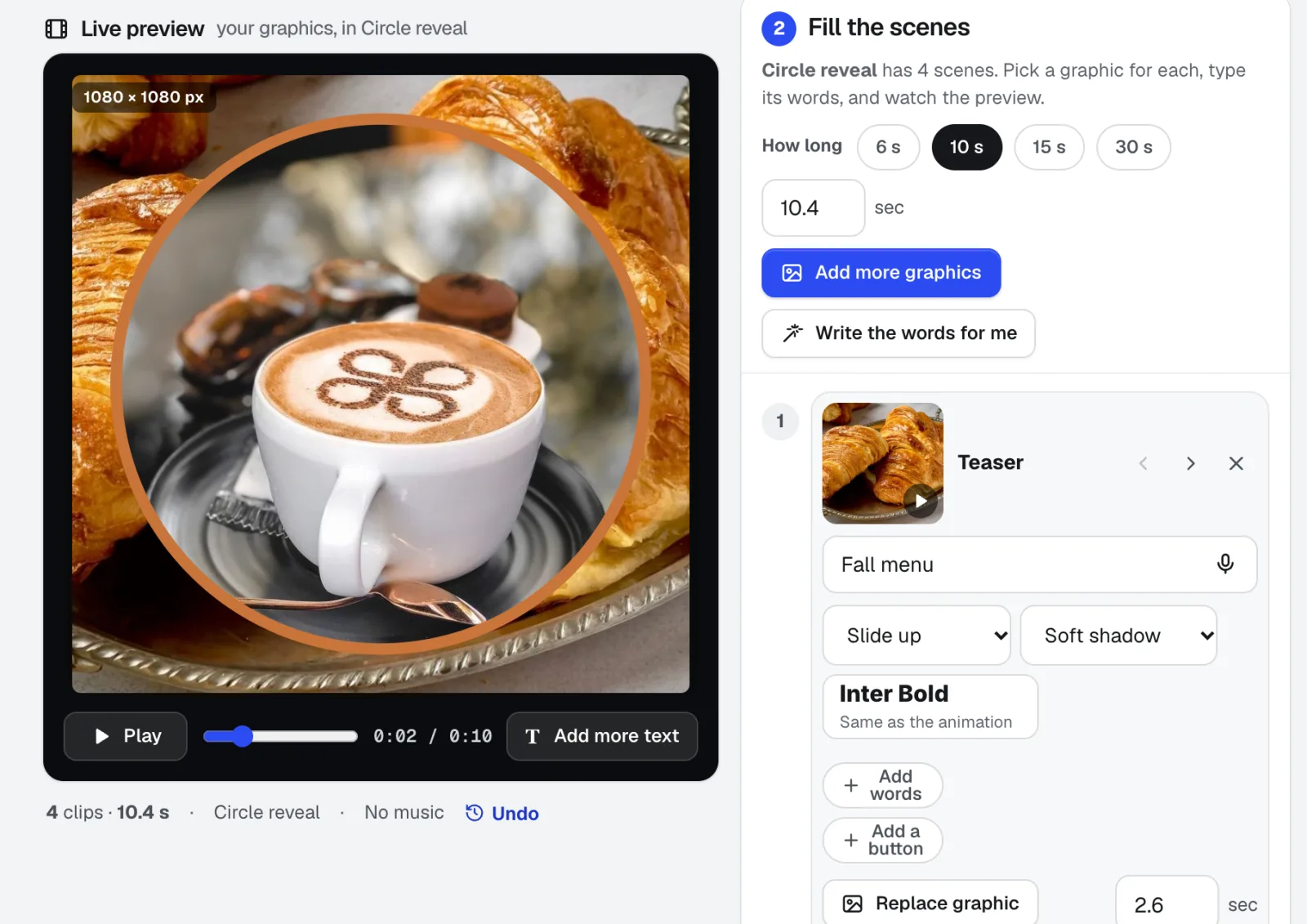
Motion Maker
NewAn animated GIF maker for email, plus banners and promo clips: pick one of 29 animation styles, drop in your photos, type the words right on the stage, and add music cut on the beat. Export an MP4, WebM or email-ready GIF straight from your browser.
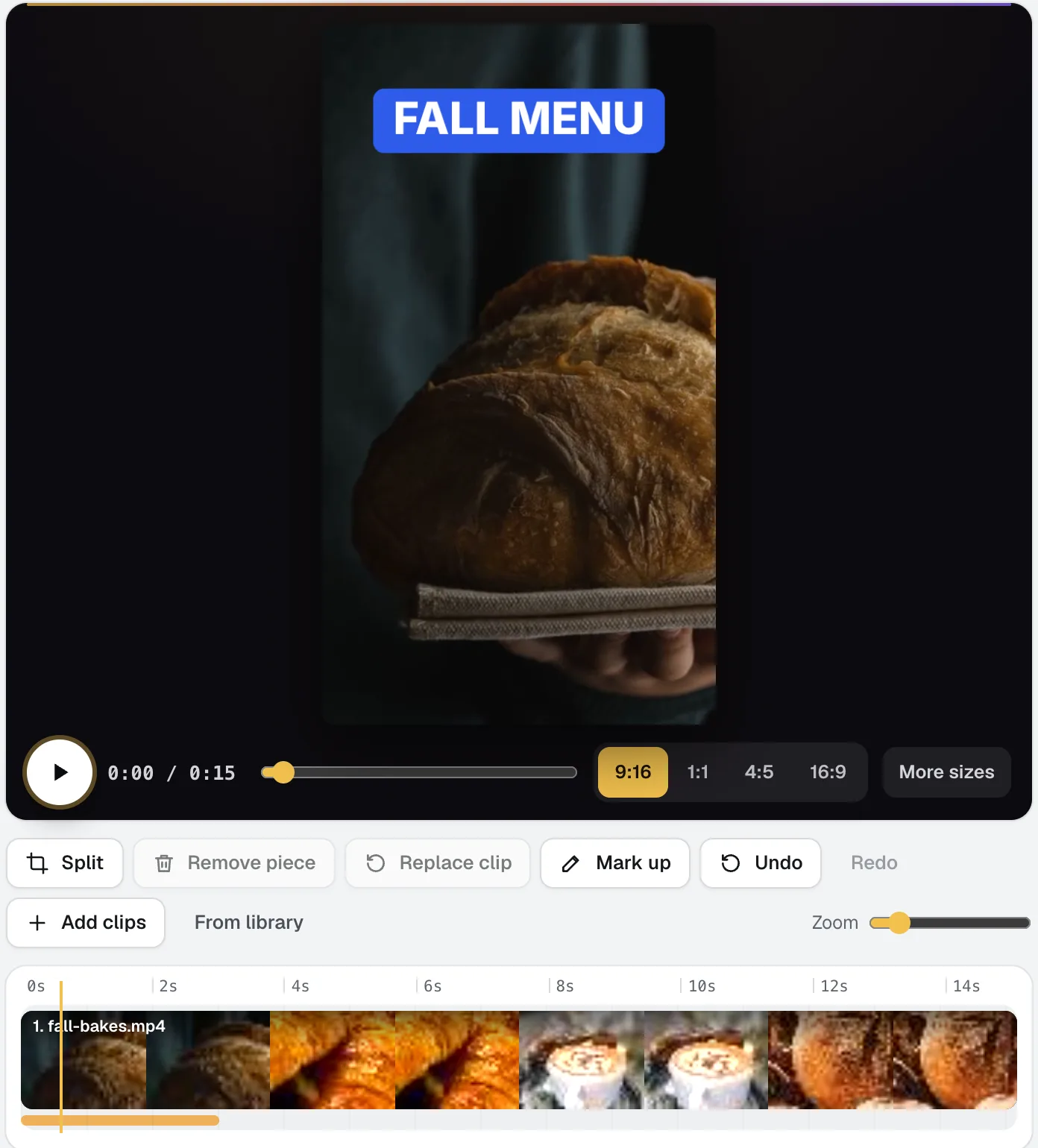
Video Kit
NewVideo Kit is an AI video editor for social media: drop in your clips and edit them like a document. Delete words to cut the video, remove pauses and ums in one pass, and Ask for changes in plain words. Captions, sizes, music and your logo are built in.
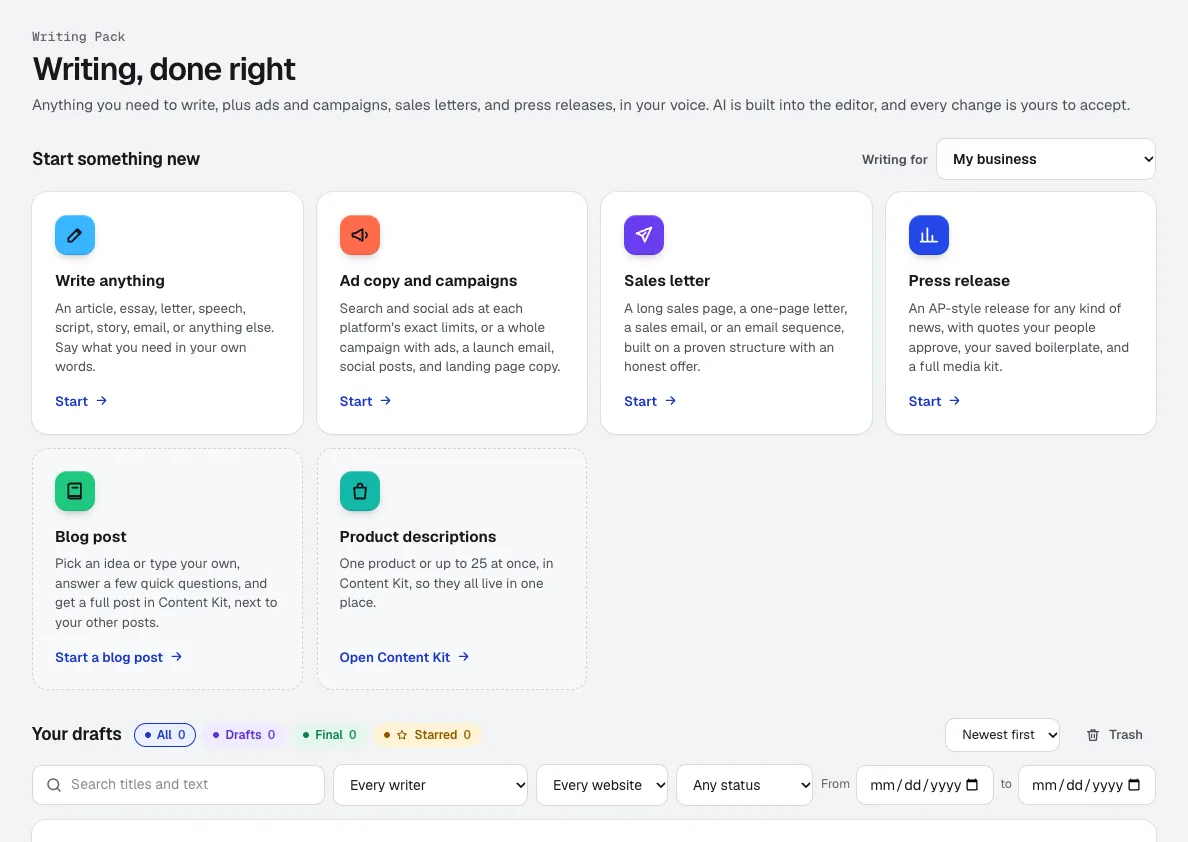
Writing Pack
NewAn AI copywriting tool for anything from a speech to a full ad campaign, in the voice you set in Brand Voice. AI is built into the editor, and every change it suggests is yours to accept or reject.
Use Voice Kit today.
Make a free aiKit account and open Voice Kit, plus every other tool in your kit.
Page last checked against the product on 2026-11-01.