

Trades & service businesses
The AI kit for trades and service companies.
A website that books jobs and takes quote requests with photos, quotes built from your own prices, and review requests that go out on schedule after each job.
Sound familiar?
The day, before aiKit.
“I lose jobs because I can't call back fast enough.”
“Customers text me photos at 10 p.m. and I lose them in my phone.”
“My website hasn't changed in four years and I don't know who built it.”
“Happy customers never leave reviews unless I chase them.”
The kit
7 tools for trades & service businesses.
Ready-made for your industry and customized to your business: start with these, then add or remove any tool.
Your websites
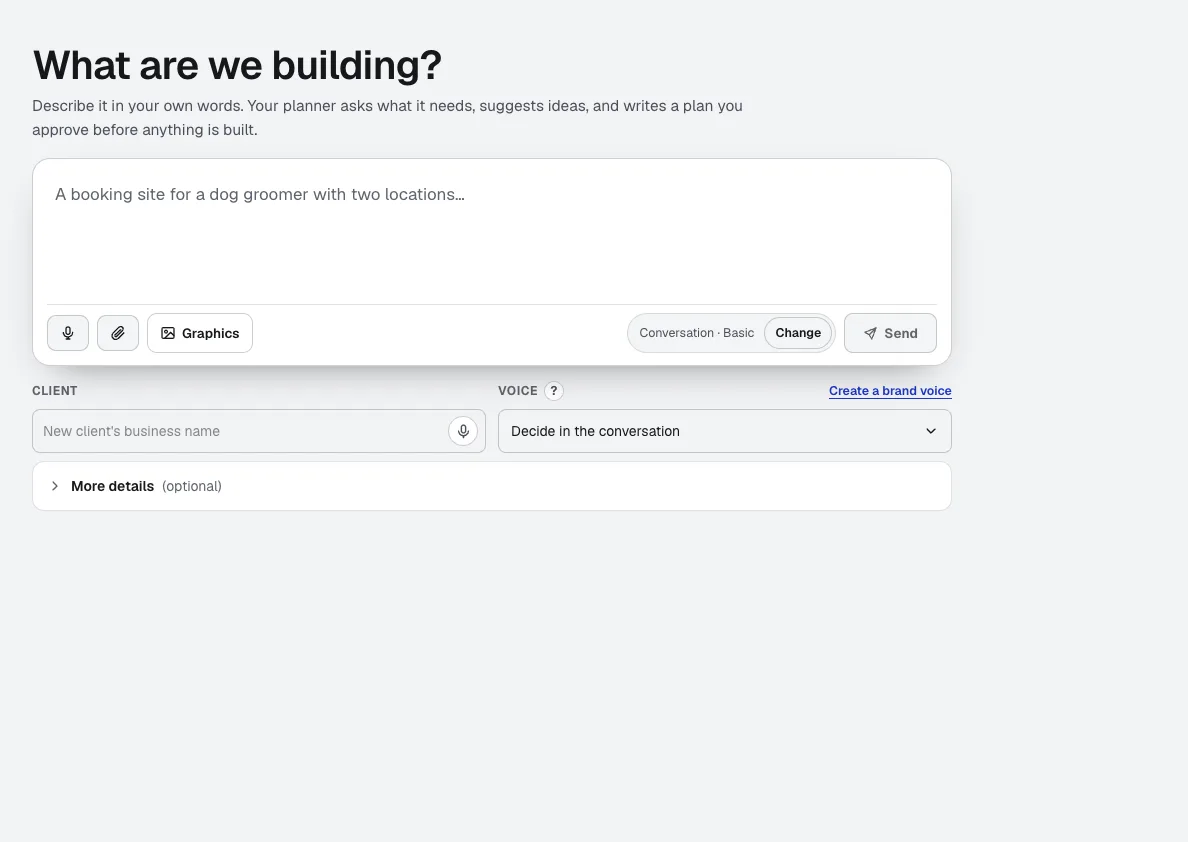
aiKit is an AI website builder with hosting: it plans the pages, writes the copy, builds the site and hosts it. Every later change is a request in your own words, saved as a version you can undo, for your own business or for every client you run sites for.
Quote Studio
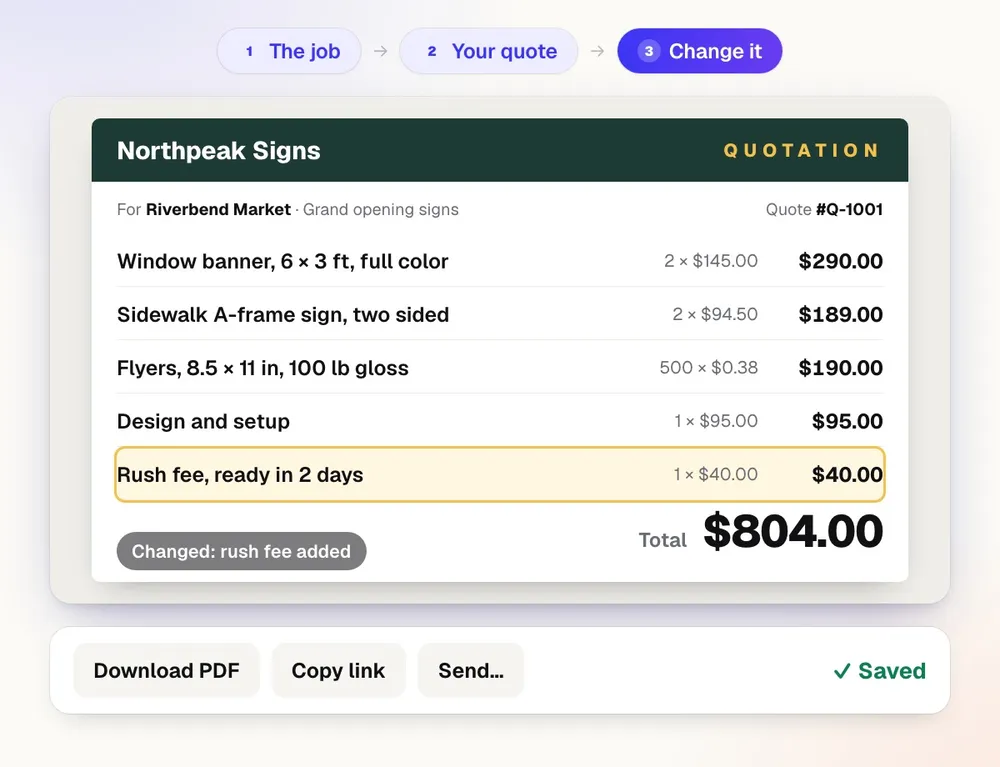
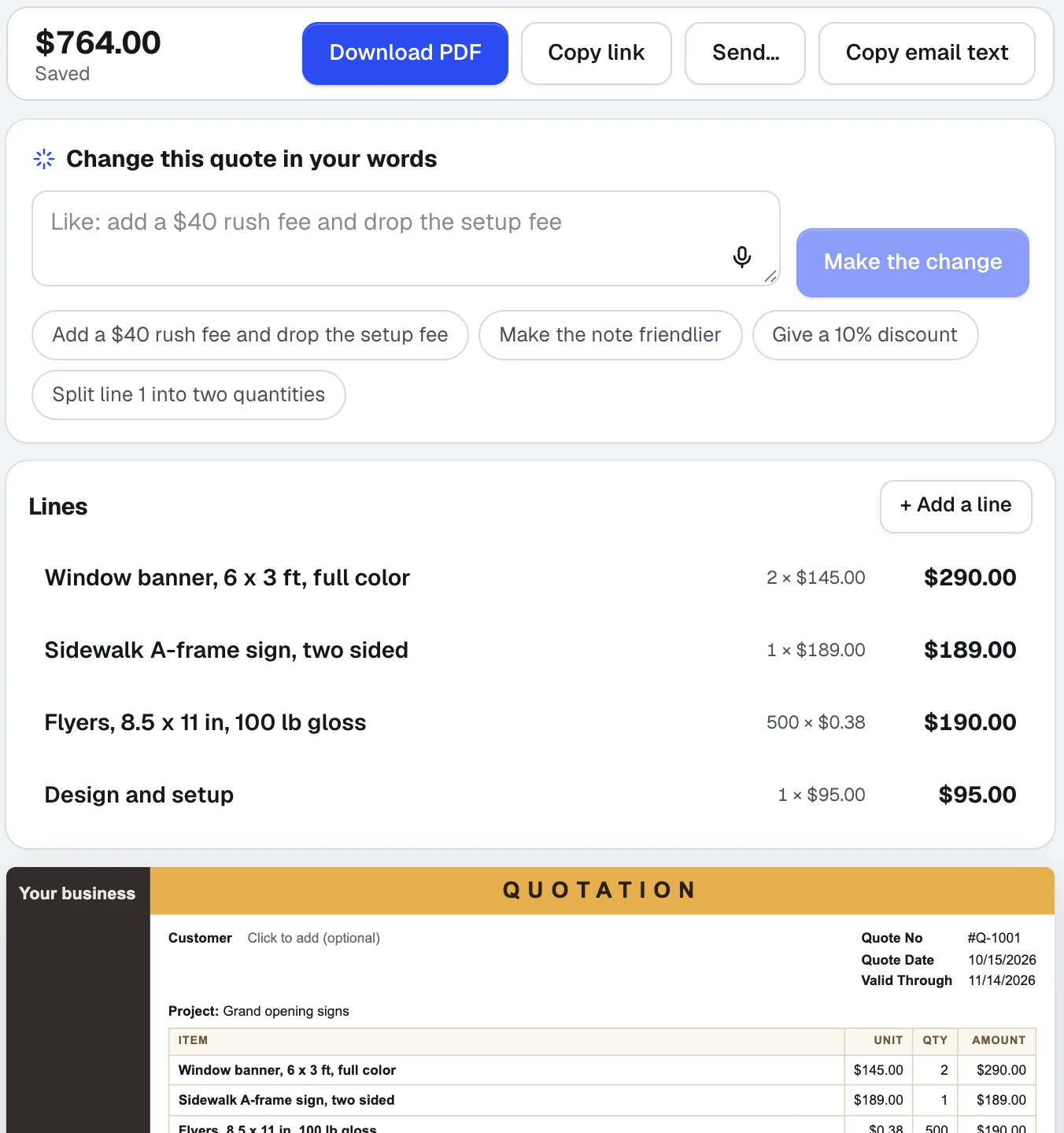
NewPaste a customer's email, dictate the job, or add a photo of a handwritten list. Quote Studio is quoting software that drafts a one-page quote using only your own prices, then you download the PDF or send a live page your customer accepts online.
Reviews & customer photos
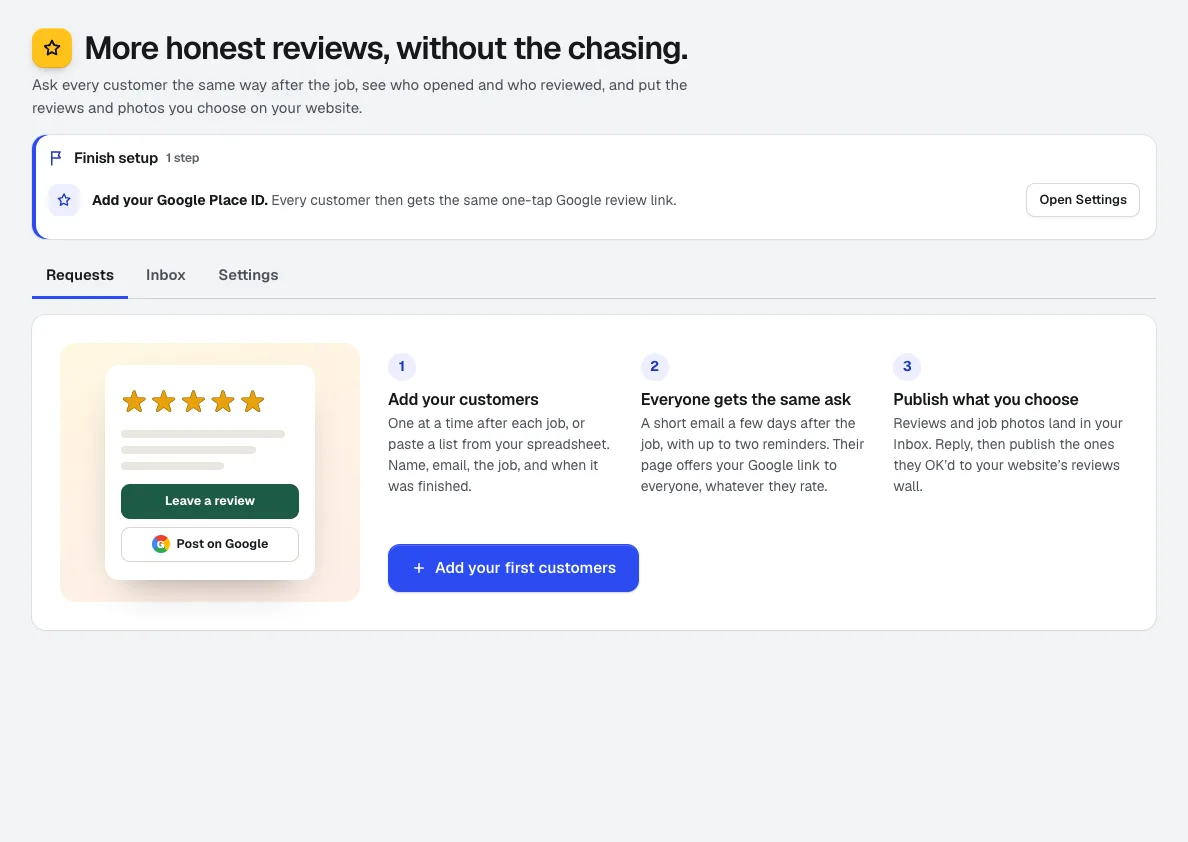
NewGet more Google reviews: add customers after the job and Reviews asks them on schedule, tracks who opened, visited, and reviewed, collects job photos, and puts the reviews you pick on your aiKit website.
Email Studio
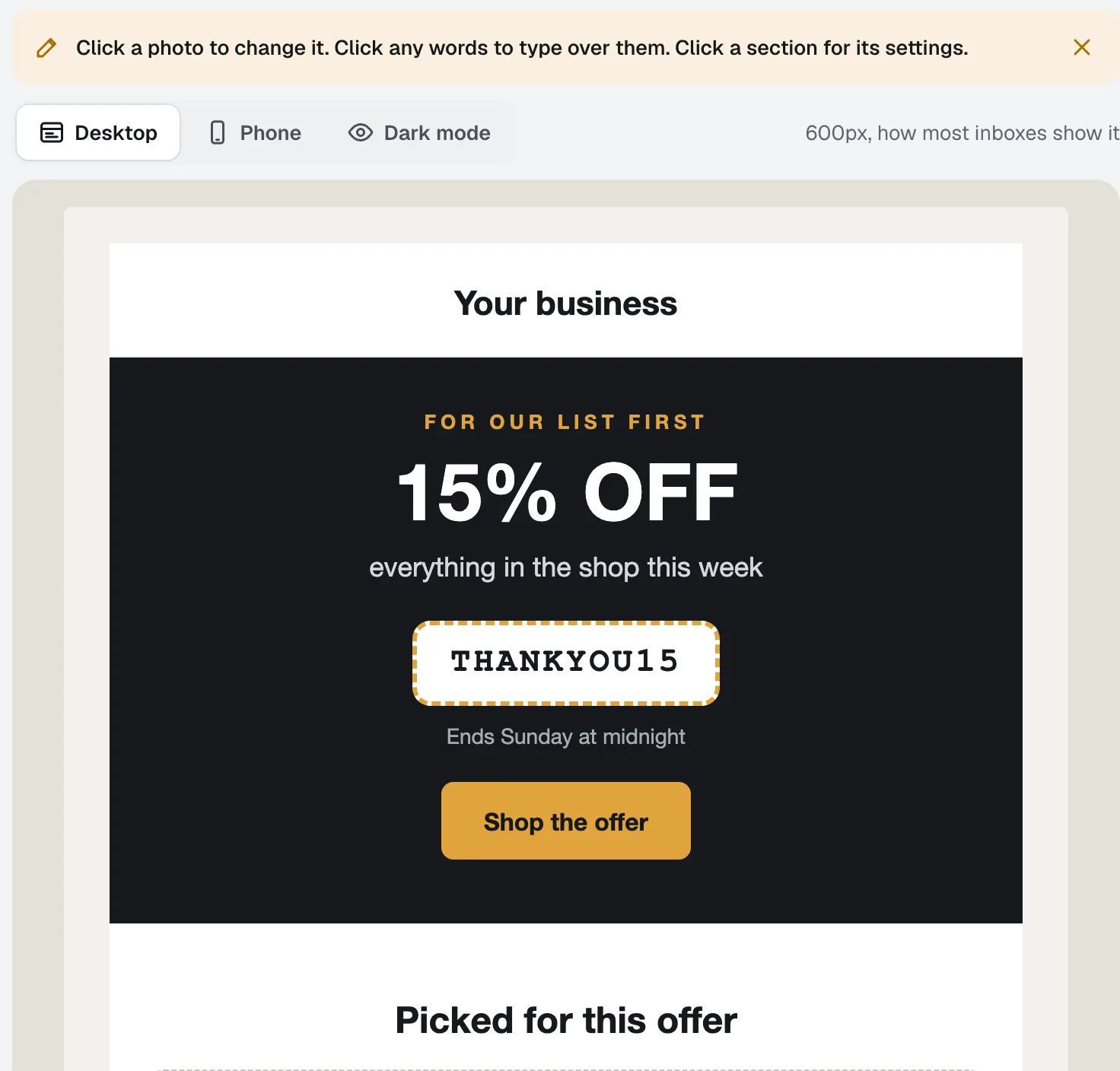
BetaEmail Studio is an email template builder you edit by clicking the email itself. Pick a goal, start from a layout in your brand colors, and let the assistant write it in your Brand Voice, then export the HTML or save it to your own Klaviyo as a template.
aiKit Hub
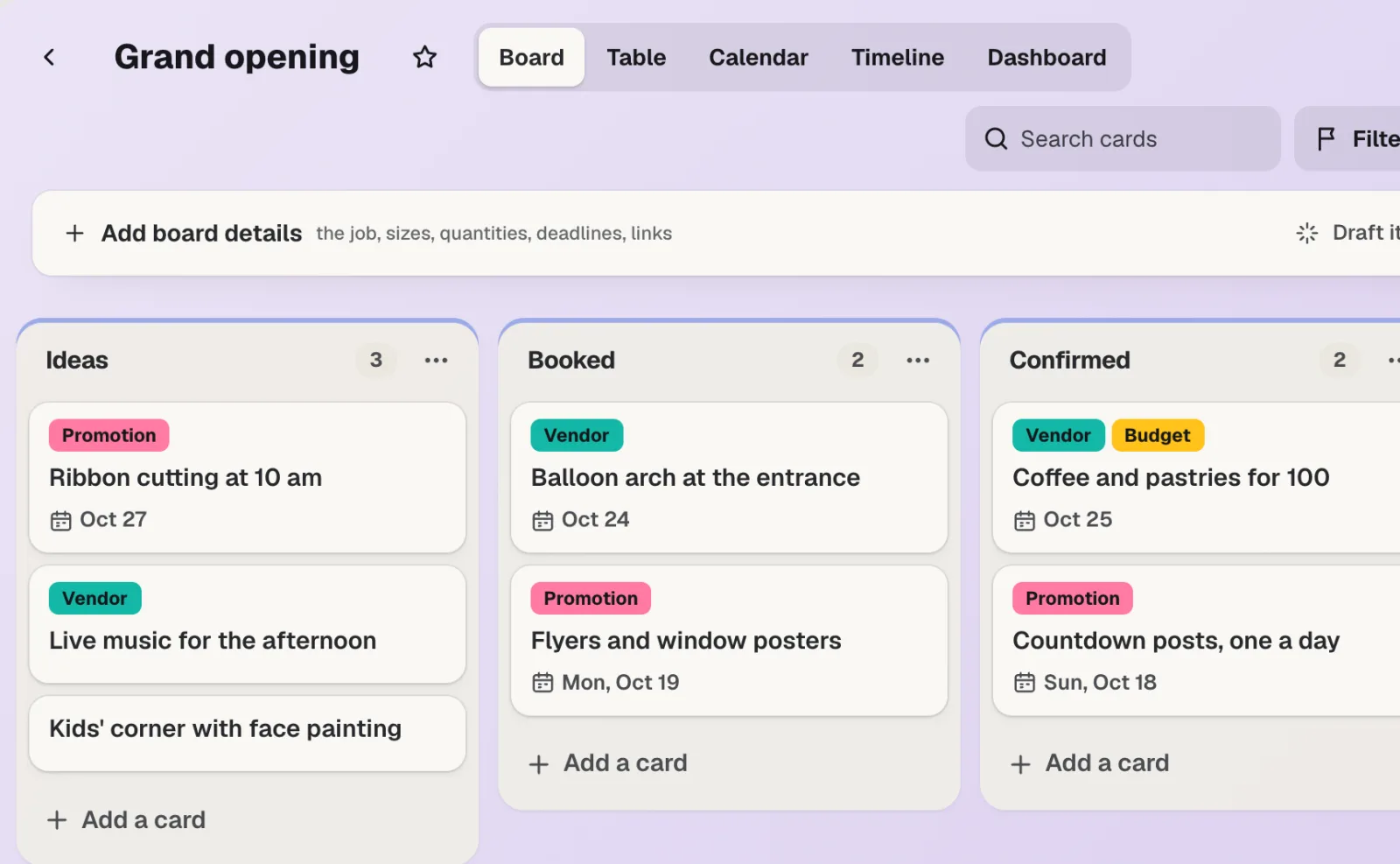
NewaiKit Hub is client project management software: to-do lists that flip into boards, messages, chat, a shared schedule, docs and files, and a client view that shows only what you choose. Your quotes, proofs, bookings and website requests live on the cards they belong to.
Magic Canvas
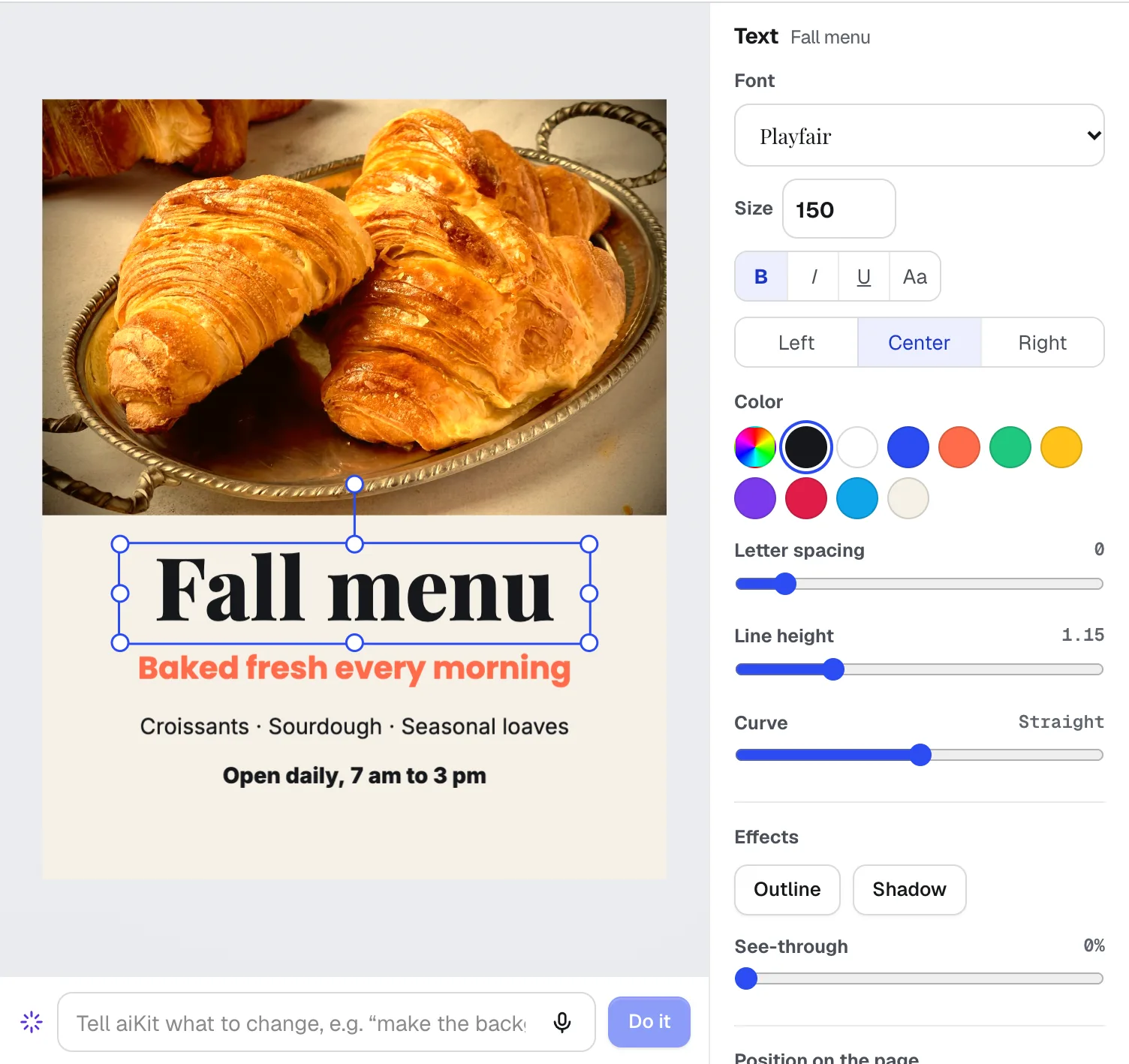
NewMagic Canvas is an AI flyer maker and social post designer: it lays out posts, flyers, cards, banners and email headers from your words, then lets you change anything by hand or by saying it. Your brand colors and logos are one click away.
Video Kit
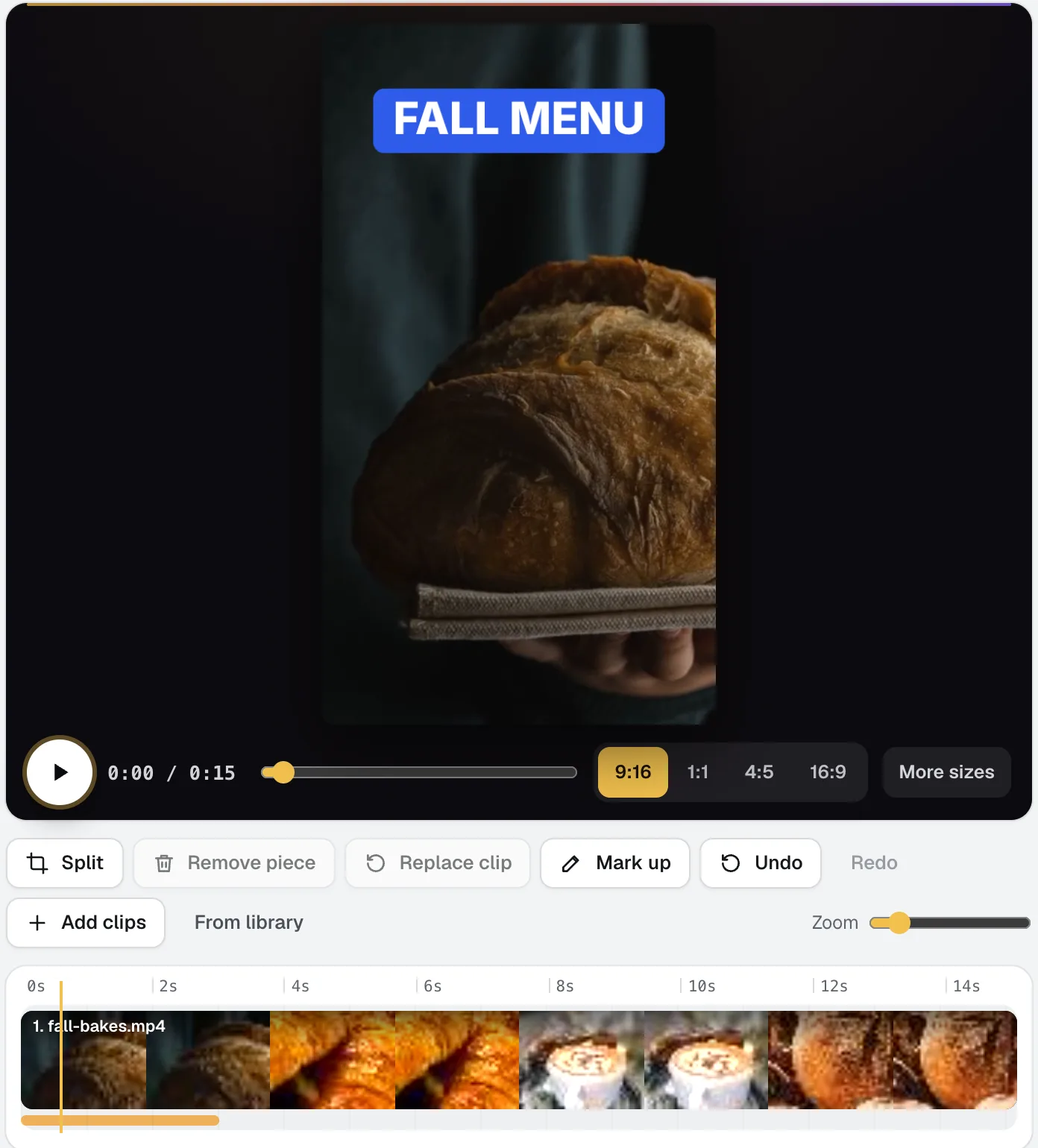
NewVideo Kit is an AI video editor for social media: drop in your clips and edit them like a document. Delete words to cut the video, remove pauses and ums in one pass, and Ask for changes in plain words. Captions, sizes, music and your logo are built in.
In practice
What trades & service businesses businesses do with aiKit
A plumbing company's site that books jobs
An invented plumbing company describes its services and service area, adds online booking and a quote request page with photo upload, and gets every request on one Requests tab instead of scattered voicemails.
A handmade landing page goes live
A made-up cleaning service exports a one-page site as a zip, uploads it, and gets its plain HTML form wired to a Requests inbox with no changes to the design.
Seeing what's done and what's next
A made-up landscaping company checks the progress band to see pages built, tools built and questions answered, then presses Make it on the next step: a Book online page.
Uniforms and truck-ready yard signs
Brightway Landscaping puts its logo on its own blank polo photos with My products, and on a yard sign staked in grass, to choose the crew's look.
Work-order forms from a logo
A heating and cooling company needs 3-part work orders numbered from 1001. The HVAC form template comes with the trade's fields and checklist, the glued edge kept clear, and an FPO file showing the printer where the numbers go.
Vehicle lettering and yard sign art
A sign and lettering shop sees which customer logos are sharp enough before quoting, and which need a vector file.
A review ask in the company's voice
A plumbing company starts from the Review ask layout, and the assistant writes it in the company's Brand Voice. The spam check catches an all-caps subject before it goes anywhere.
An owner with little time checks limits
A made-up contractor who holds a few positions sets a max loss per trade and per day, then presses Check my positions once a day to see what needs a decision.
A landscaping estimate from a voice note
A landscaper says the job into the mic on the way back to the truck: mulch, edging, two shrubs. The quote comes back with each line, and the shrubs marked Price needed because they aren't on the price list yet.
A service agreement before the first visit
A cleaning company sends its agreement to a new office client. The office manager initials the cancellation terms and signs; the owner countersigns second.
A contractor's labor and materials
A made-up home services company bills 4 hours of plumber labor, the water heater and fittings, with sales tax on the materials only and the job site address and work order number in the header.
Leads after hours
A plumbing company's chat shows Quote and Send a message buttons at night, so the morning starts with a list of real jobs.
A crew that writes with one voice
A family-run landscaping company describes itself as friendly and down-to-earth, adds the rule "Always mention free estimates", and every quote note and post follows it.
A steady blog without a writer
A landscaping company queues ten seasonal ideas in March, writes one post a week in its friendly voice, and checks each Ready to publish score before it goes up.
Search ads for a spring push
An HVAC company writes Google Search and Meta ads for a spring tune-up at each platform's limits, then downloads the Google Ads Editor CSV to upload in one go.
An inside word for the team
A cleaning crew coins a word for a job finished early, with For work, and the owner uses it in the team chat every Friday.
A review ask after every cleaning
A cleaning company pastes last week's 80 customers from a spreadsheet. Each is asked three days after their visit, at a daily limit of 20, and the month strip tracks progress toward a Google goal.
Dinner after a long job
A tradesperson types what's left in the fridge on the drive home and picks a 15-minute recipe that uses only what's there.
New-hire safety training
An HVAC company builds four short lessons on job-site safety from its own checklist PDF, with a quiz per lesson, a manager summary and a certificate of completion. Company-specific rules show as placeholders to fill in.
A logo off the side of a truck
Brightway Landscaping has no original file, only its truck. A phone photo of the door decal becomes a vector logo with a white version for dark shirts.
Walk a customer through their quote
A landscaping company records its screen over the quote, points at each line, and emails the link; the to-do list on the watch page reminds the customer to send their address.
A tip video from the job site
A plumber films a 90-second tip on his phone between calls. He cuts the false starts by deleting words, adds captions and a "Call today" outro with the shop's number, and posts a 9:16 reel that evening.
Before and after, side by side
A landscaper uses Split screen to slide a before photo past an after photo, adds "Free estimates" as a button, and posts it as a square clip.
A product photo without a studio
A bakery supply shop builds its new mixing bowl from photos and saves a transparent cut-out and a white-background store photo the same day.
A before-and-after reel
A landscaping company describes a yard turning from overgrown to tidy with a drone fly-over, and posts the tall clip as a reel.
A phone greeting that sounds the same every time
A cleaning company imports its hours and service area from its About page, trims it to 30 seconds, and downloads a WAV for its phone system.
A phone greeting that sounds professional
A plumbing company records its greeting on a phone, cleans up the room echo, trims the start, and saves a small WAV for its phone system.
Hold music and a catchy jingle
A plumbing company makes a seamless loop for its phone line and a 15-second jingle about same-day service for its truck video.
Before-and-after posts that look professional
Brightway Landscaping places two job photos side by side, matches their color with Match Color, adds the logo from the Brand tab and saves a post-ready PNG.
Ads without a photo shoot
Brightway Landscaping describes a fresh spring yard, picks Landscaped yard and Bright sun, and sends the best one to Magic Canvas for a flyer.
A trades company that looks established
An invented plumbing company adds its website, ticks cards, yard signs, door-ready postcards and display ads, and has a matching set before lunch.
A flyer with real contact details
Brightway Landscaping describes a spring cleanup flyer. The phone number and price come only from what they typed, and the PDF goes to the printer with bleed and crop marks.
Training a new crew
A roofing company turns its safety checklist into a Training deck with step slides and speaker notes, then shares the live link with new hires.
The site visit, written down
A contractor records a walk-through with a homeowner, asks "which rooms get new flooring?", and sends a follow-up email that lists exactly what was agreed.
Bookings become cards
A made-up cleaning company links its aiKit website, so every new booking and quote request becomes a card in the right list, due the day before the visit.
Marketing automation, set up for real
A landscaping company owner wants welcome emails, review requests and a monthly newsletter running in six weeks. Goal Kit plans it around 3 hours a week, opens Email Studio and Reviews for the steps they do, and Guide me covers moving customer emails out of a spreadsheet.
A window-cleaning company finds its gap
An invented window-cleaning company sees Path to contact graded D because its site has no form, and a plan that starts with a Get a quote page.
Travel time built in
A mobile detailer adds a 30-minute buffer after every job, so the next booking always leaves time to drive.
Business cards with every detail right
Brightway Landscaping fills in the name, title, phone and website for the front and the services for the back. Each designer delivers front and back, and the AI check confirms the name.
Step by step
Guides for trades & service businesses
- Quote software for contractors: from a voice note to a signed yes: Turn a voice note or a customer's email into a one-page contractor quote priced from your own prices. Send a live page they accept by typed name.
- Online booking for salons, on your own website: A booking page on your salon's website: services, stylists, real open times, reminders and self-serve changes, plus a day calendar for the front desk.
- Get more Google reviews for a service business, the honest way: Ask every customer for a review the same way, with your Google link, reminders that stop on their own, and a reviews wall for your website. No gating.
- Websites for contractors that bring in quote requests: Describe your trade and get a hosted website with a quote request page, booking and a reviews wall, then change it by asking. Free to start.
Questions
Questions trades & service businesses businesses ask
Can AI build a website for my service company?
How can customers book jobs online from my website?
What's the easiest way to get more Google reviews?
Can I quote jobs faster with AI?
Do I need to be technical to use aiKit?
Can customers send photos with a quote request?
Can customers accept my estimate online?
Can I make a quote from a voice note on the way back to the truck?
How do I know right away when a new lead comes in?
Can a review request go out automatically after each job?
Can I print work order forms with my company logo?
Can AI make a flyer for my service without making up my prices?
Can I turn a phone photo of my truck decal into a clean logo?
Other kits: Print, promo & signs · Marketing & agencies · Retail, restaurants & e-commerce · Education & training · Events, lighting & AV · Real estate · Creators, coaches & consultants
Your kit is ready.
Make a free account and open the trades & service businesses kit today.