

What you need
- The design as a PDF, PNG, JPG, WEBP, GIF or SVG (up to 40 MB), or a video or sound file
- The email address of each person who should review or approve it
- For printed pieces: the finished width, height and bleed
- A free aiKit account; your customers need no account at all
Steps
Start a new proof
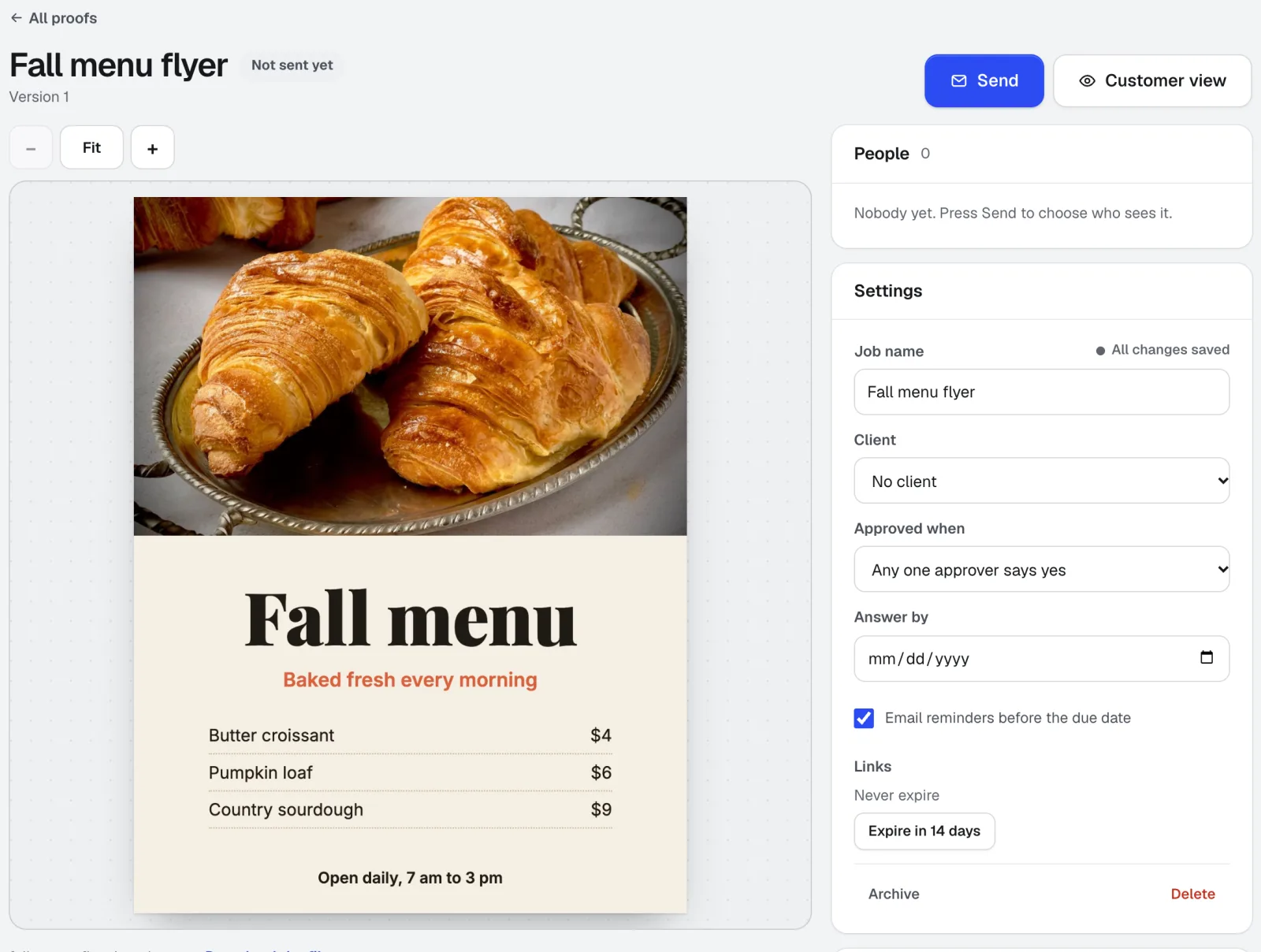
Open Customer Proofs and press New proof. Drop the file on the box or press Choose a file. Your browser shows page 1, the page count and the size before anything uploads. You can also pick a version you made in Printer's Helper. Give the job a name and pick its client.
Customer Proofs →Turn on cut and safe lines for printed pieces
Tick Show cut and safe lines and enter the finished width and height in inches and the bleed in the file (1/8 in to start). Your customer then sees a red cut line, a blue dashed safe area and the shaded bleed, so they judge the piece as it will be trimmed.
Customer Proofs →Add the people and their roles
Press Next: who gets it. Type or paste email addresses into Send to. Each person gets a role: Approver says yes or asks for changes, Can comment adds notes without signing off, and FYI only sees it. Under Approved when, choose whether any one approver or all approvers must say yes.
Customer Proofs →Set a note, a due date and reminders, then send
Add a Personal note that sits at the top of the proof. Answer by sets an optional due date, and the reminder option emails approvers who haven't answered the day before and on the day. Links stop working can be set to 7, 14 or 30 days. Press Send. If email isn't set up on your account yet, each person gets a Copy link button so you can text or email it yourself.
Customer Proofs →Your customer reviews on their phone
On a phone, Mark up and Answer stay in a bar at the bottom. They can pinch to zoom, drop a numbered pin, draw a box or arrow, or highlight words. Approve opens a checklist (spelling and names, colors, size and shape, dates, prices and phone numbers), then they type their full name to sign. Request changes takes a note.
Customer Proofs →Follow up and keep the record
People shows each person as Sent, Opened, Approved or Changes. Remind nudges an approver who hasn't answered. Once anyone answers, Approval record opens a printable page with every version, every answer, the typed signatures and the exact times.
Customer Proofs →Send version 2 to the same links
When changes come in, Summarize the changes turns the notes and pins into a numbered to-do list. Make the edits in your design app or in Printer's Helper, press Upload new version, and fill in What changed in this version. Everyone sees version 2 on the link they already have, with Compare with version 1 and Show what changed.
Customer Proofs →
Tips
- Send each private link only to its own person. Anyone holding a link can answer as that person, which is also what puts a real name on every approval.
- Fill in What changed in this version every time. Customers approve faster when they only have to check the parts that moved.
- Set an Answer by date with reminders on. A proof with a date gets answered; a proof without one waits in an inbox.
- For print jobs, always turn on cut and safe lines. Most late surprises are text too close to the trim, and the lines make that obvious on a small screen.
- Read the comments as well as the AI summary. The summary uses only what customers wrote, but it can miss nuance.
Questions
Does my customer need an account to approve a proof?
Is an approval in Customer Proofs a legal signature?
Can more than one person approve the same proof?
Can I proof a video or a radio spot the same way?
What happens when the customer asks for changes?
Terms in this guide
How businesses use it
Print-ready files for print shops: fix customer art by asking
Fix customer files by asking: add bleed, resize, check, set PDF boxes. Get a print-ready PDF, a file check and a proof link. Free to start.
Use caseOnline proofing for print shops: a clear, signed yes on every job
Send print proofs with cut and safe lines. Customers pin comments and approve by typed name from a phone, no account. Free to start with aiKit.
Use caseVirtual samples for promo products, in every color, with a spec sheet
Put a customer's logo on shirts, caps, mugs and signs in every color, check the decoration, and send a spec sheet and approval link. Free to start.
Checked against the product on 2026-10-31.