

What you need
- A few pieces of writing that already sound like you: emails, posts, web pages, or a PDF or Word file
- A short list of words you always use and words you never use
- A free aiKit account (drafting a voice, Hear it and the checker use no tokens)
Steps
Make the voice
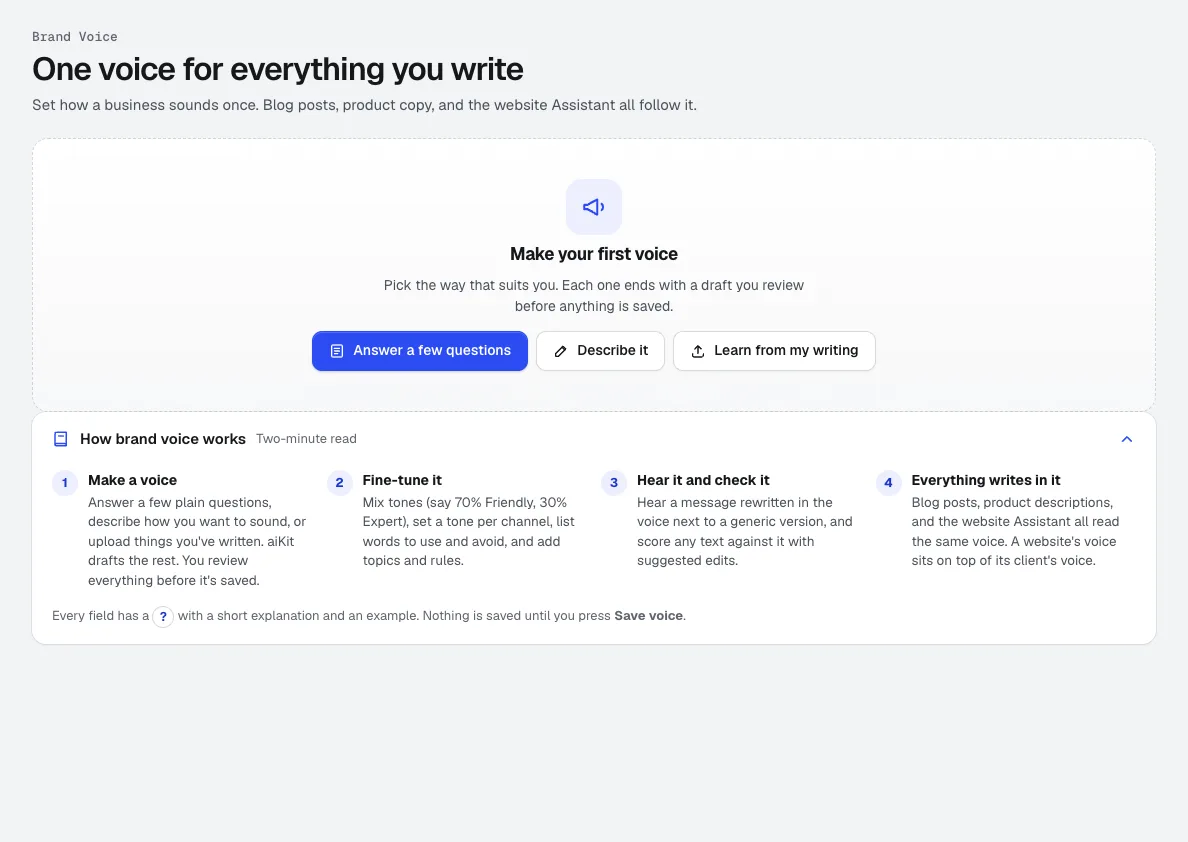
Open Brand Kit and press New Brand Kit. Choose who it is for: you, a brand, a client, or one website. Then pick a way to start: Answer a few questions, Describe it in your words, or Learn from my writing, which reads your files or links and quotes what it found.
Brand Kit →Review the result before saving
Here's the voice we made shows the tone mix (for example mostly friendly with some expert), the reading level, Do and Don't lists, words to use and avoid, and a short sample in the new voice. Change anything, then save.
Brand Kit →Tune the tone, words and rules
In the editor, set the tone mix with weights and a different mix per channel (website, blog, product copy, email, social). In Words, keep Sound like a person, not AI switched on. Add rules every piece must follow, like always mention free estimates, and mark the important ones Required.
Brand Kit →Hear it and check it
In Hear it & check, Hear it in this voice writes one message twice, generic and in your voice, and lists what changed. Check how well it matches scores any text from 0 to 100, flags words to avoid and missing required rules, and Apply to the text swaps in each suggested edit.
Brand Kit →Write anything in Writing Pack
Open Writing Pack and pick Write anything, Ad copy and campaigns, Sales letter or Press release. Brand voice on Automatic uses the website's voice, or your own; you can pick any saved voice. Press Write it, and facts you didn't give are left as [placeholders], never guessed.
Writing Pack →Fix any line in your voice
Select text in the editor and choose In my voice, or Improve, Shorten or Change tone. Every AI change shows as a suggestion with the old words struck through, ready to Accept or Reject.
Writing Pack →Let every other tool use it
Content Kit's blog posts and product descriptions, Email Studio, Voice Kit scripts, Music Maker lyrics and Reviews request wording all read the same kit. Each tool's Brand Kit bar shows which kit is in use, with Switch kit. A thumbs up on a result is remembered and steers later work.
Content Kit →
Tips
- Feed it more and longer samples. A voice learned from a few short lines can misread you; five or six real pieces give it a clear picture.
- Write rules as instructions you could check, like always end with a question, rather than vague goals like be engaging.
- Keep a separate kit per client or brand. A website's kit sits on top of its client's, so each site can add its own details without copying everything.
- Run the checker on writing from teammates and other tools too. Anything under 70 is worth a second pass before it goes out.
- Use thumbs up on results you love. Liked results are remembered in the kit and pull future work toward them.
Questions
What is a brand voice?
Can AI learn my voice from my old writing?
How do I stop AI writing from sounding like AI?
Can I keep a different voice for each client?
Which tools write in my brand voice?
Terms in this guide
How businesses use it
AI ad copy for agencies, at every platform's limits
Write ads at each platform's exact character limits, or a full campaign with ad groups, keywords and upload CSVs, in each client's brand voice.
Use caseAI product descriptions for online stores, up to 25 at once
Write product descriptions one at a time or 25 at once, with short and long copy, features, specs and alt text, in your brand voice. Download a CSV.
Checked against the product on 2026-10-31.